Opus Clip review
On this page
Verdict: Opus Clip is a strong, polished AI clip tool, and the right pick if you want each clip scored for virality, posted to your social accounts for you, or shared across a small team. It's a weaker fit for long podcasts, because Pro includes only 5 hours of video a month, and its free plan is watermarked. For a weekly hour-long show, expect to need Pro at $29 a month.
Opus Clip is the best-known AI clip generator. You upload a long video, it finds the moments worth posting, and it returns short vertical clips with captions. This review covers what you get on each plan, where it shines, where it doesn't, and what it costs for real schedules.
Disclosure: we make ClipFlame, a competing tool. We've tried to judge Opus Clip on its own terms. Plan details come from Opus Clip's pricing page and help center, checked in September 2026.
Opus Clip at a glance
| What it does | Turns long videos into short captioned clips, scores them, and can post them |
| Pricing model | Per minute of uploaded video |
| Plans | Free, Starter $15/mo, Pro $29/mo, Business custom |
| Free plan | Yes, watermarked, media kept for 3 days |
| Best for | Auto-posting, virality scores, small teams |
| Less suited to | Long podcasts on a budget |
What Opus Clip does well
Clip picking on talking videos. Like other transcript-based tools, it's at its best on podcasts, interviews, tutorials and commentary. It finds moments with a clear point and cuts them into standalone clips.
The virality score. Every clip gets a score from Starter up. It's not a prediction you should bet on, but it's a quick way to sort twenty clips down to the five you'll look at first.
Posting for you. Pro includes a social scheduler for YouTube, TikTok, Instagram, LinkedIn, Facebook and X. If you want clips to go out without opening each app, it's a real time-saver. Note that it sits on Pro: on the $15 Starter plan you post by hand. ClipFlame, by comparison, includes its scheduler on every plan.
Team and developer features. Pro adds a workspace for up to four people, four brand templates, AI B-roll, and a video editing API, scheduler API and MCP connector. Few tools at this price offer an API.
Custom reframing and clipping modes on Pro give you more control when the automatic framing gets it wrong.
Where Opus Clip falls short
Small minute allowances and long videos. Opus Clip counts every minute you upload. A two-hour interview uses 120 minutes whether it gives you four clips or twenty. Starter's 150 minutes a month covers about two and a half hours of video, which isn't a weekly podcast. See Opus Clip pricing explained for the maths.
The free plan is a demo, not a plan. Clips are watermarked, media expires after three days, and scores and scheduling aren't included. It's fine for a look; you can't really post what it makes.
Clips, not the whole episode. Opus Clip focuses on short clips. Chapters, an SEO description, thumbnails and written posts for the full episode aren't what it's built for, so you'll still do that packaging elsewhere.
Starter is thin. One brand template, media kept 29 days, no AI B-roll and no team features. Most regular users end up on Pro.
Plans and what they include
| Plan | Price | Key inclusions |
|---|---|---|
| Free | $0 | Watermarked clips, 3-day storage, basic features |
| Starter | $15/mo | No watermark, virality score, 1 brand template, 29-day storage |
| Pro | $29/mo | Social scheduler, team of 4, 4 brand templates, AI B-roll, APIs, 100 GB storage |
| Business | Custom | Unlimited storage and team, 4K scheduling, clip analytics, priority support |
What it costs for a real schedule
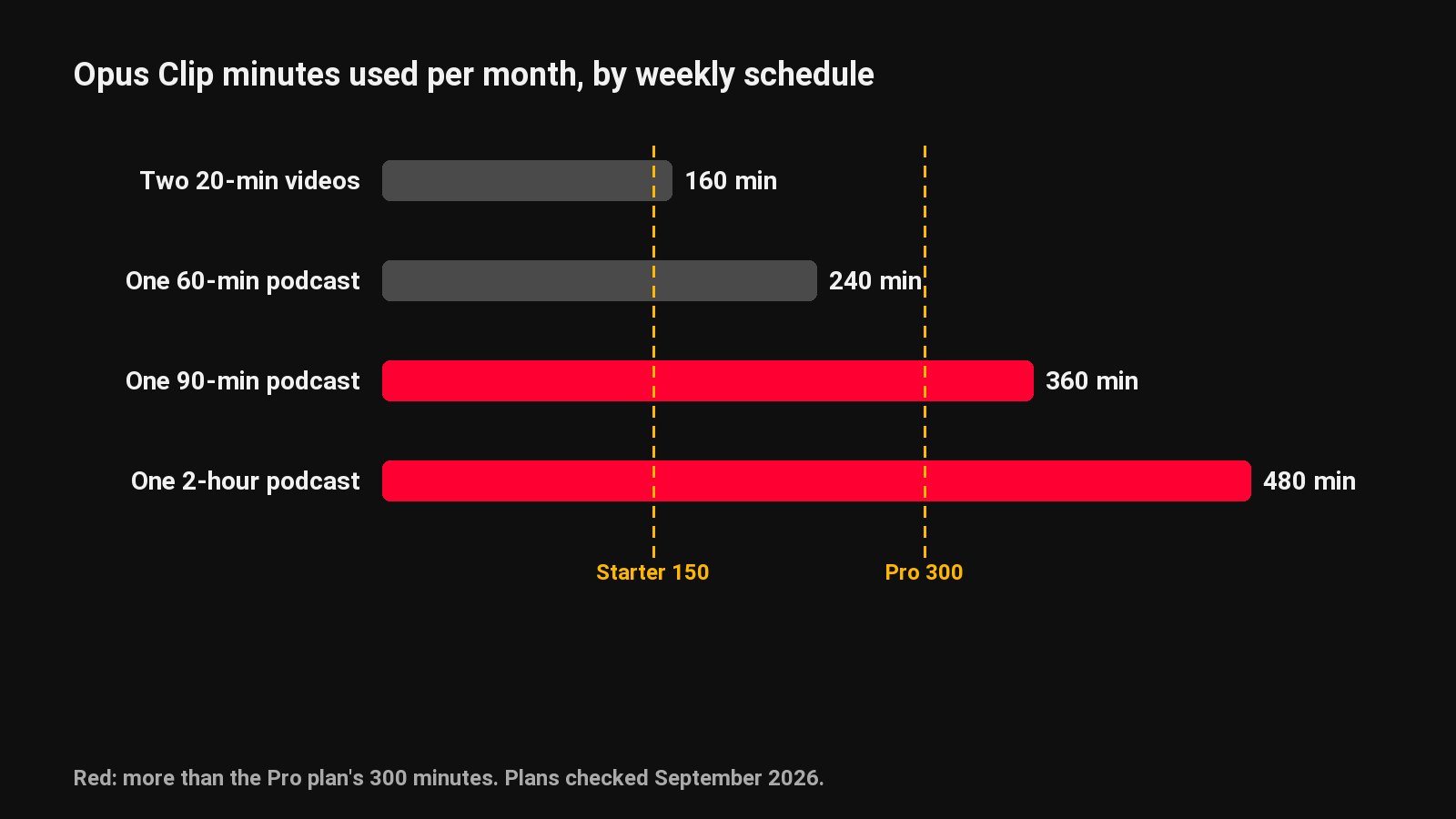
| Your schedule | Minutes a month | Plan you'd need |
|---|---|---|
| Three 10-minute videos a week | 120 | Starter, $15 |
| One 60-minute podcast a week | 240 | Pro, $29 |
| One 2-hour podcast a week | 480 | Pro plus an extra minute pack |
| Daily 20-minute videos | 600 | Pro plus extra packs |
Who should use Opus Clip
- Creators who want clips posted automatically to several platforms.
- Small teams sharing one workspace, or developers who need an API.
- Channels uploading short-to-medium videos, where per-minute pricing stays cheap.
- Anyone who finds a virality score useful for triage.
Who should look elsewhere
- Long-form podcasters. A bigger allowance fits better, and you still get a virality score on every clip. ClipFlame gives 4 hours of video for $19/month on Starter and 20 hours for $39 on Pro.
- Creators who want scheduling on the cheaper plan: ClipFlame's scheduler is on Starter as well as Pro.
- People testing before paying, who want every feature in the free option. ClipFlame's trial includes scoring, the brand kit and scheduling.
For a head-to-head, read ClipFlame vs Opus Clip. For the whole field, see Opus Clip alternatives.
Common questions
Is Opus Clip worth it?
For auto-posting, team features or short-to-medium videos, yes. For long weekly podcasts, its small minute allowances make it more expensive than tools that include more hours.
Is Opus Clip free?
There's a free plan, but clips are watermarked and media is deleted after three days. Paid plans start at $15/month.
Does Opus Clip post to TikTok and YouTube?
Yes. The Pro plan's scheduler posts to YouTube, TikTok, Instagram, LinkedIn, Facebook and X.
What's the best alternative to Opus Clip?
For long podcasts, ClipFlame (20 hours a month on Pro, with scheduling on every paid plan). For the most minutes per dollar, Vizard. Our alternatives roundup prices each for a weekly show.