ClipFlame vs Opus Clip
On this page
ClipFlame is the better pick for podcasters and talking-head creators. Both tools score every clip for virality and count the minutes you upload, but ClipFlame gives you more of them. Starter is $19 a month for 4 hours of video, against 2.5 hours for $15 on Opus Clip Starter. Pro is $39 for 20 hours, against 5 hours for $29 on Opus Clip Pro. Every ClipFlame plan includes up to 20 scored clips per video and scheduling to four platforms.
Both tools do the same core job: upload a long video, and AI finds the moments worth posting and cuts them into captioned vertical clips. Where they differ is how much video each plan covers, what the cheaper plan includes, and how much of the posting is done for you.
Disclosure: we make ClipFlame. Opus Clip's plans were checked on its pricing page in October 2026.
At a glance
| ClipFlame | Opus Clip | |
|---|---|---|
| How you pay | Hours of video a month, counted by length | Minutes of video uploaded |
| Entry plan | Starter, $19/mo ($16 yearly): 4 hours | Starter, $15/mo: 150 minutes (2.5 hours) |
| Main plan | Pro, $39/mo ($32 yearly): 20 hours | Pro, $29/mo ($14.50 yearly): 300 minutes (5 hours) |
| Free option | First 10 minutes of video free, 10 scheduled posts | Free plan, 60 minutes a month, watermarked |
| Virality score | Yes, every clip scored 0-100, best first, top clips highlighted | Yes |
| Clips per video | Up to 20 | Varies by video |
| Speaker framing | Yes, follows the speaker as they move | Yes |
| Caption styles | 7 word-by-word styles, 3 in your brand colour | Animated templates |
| Output formats | 9:16, 4:5 and 1:1 | Multiple aspect ratios |
| Titles and hashtags | Written for each clip and platform | Yes |
| Scheduling | Yes, on every plan: YouTube, Instagram, TikTok, Facebook | Yes, on Pro |
| Brand kit | Yes: watermark, end card, caption colour | Brand templates |
| Free re-renders | 30 per video | Not listed |
Pricing: hours of video for your money
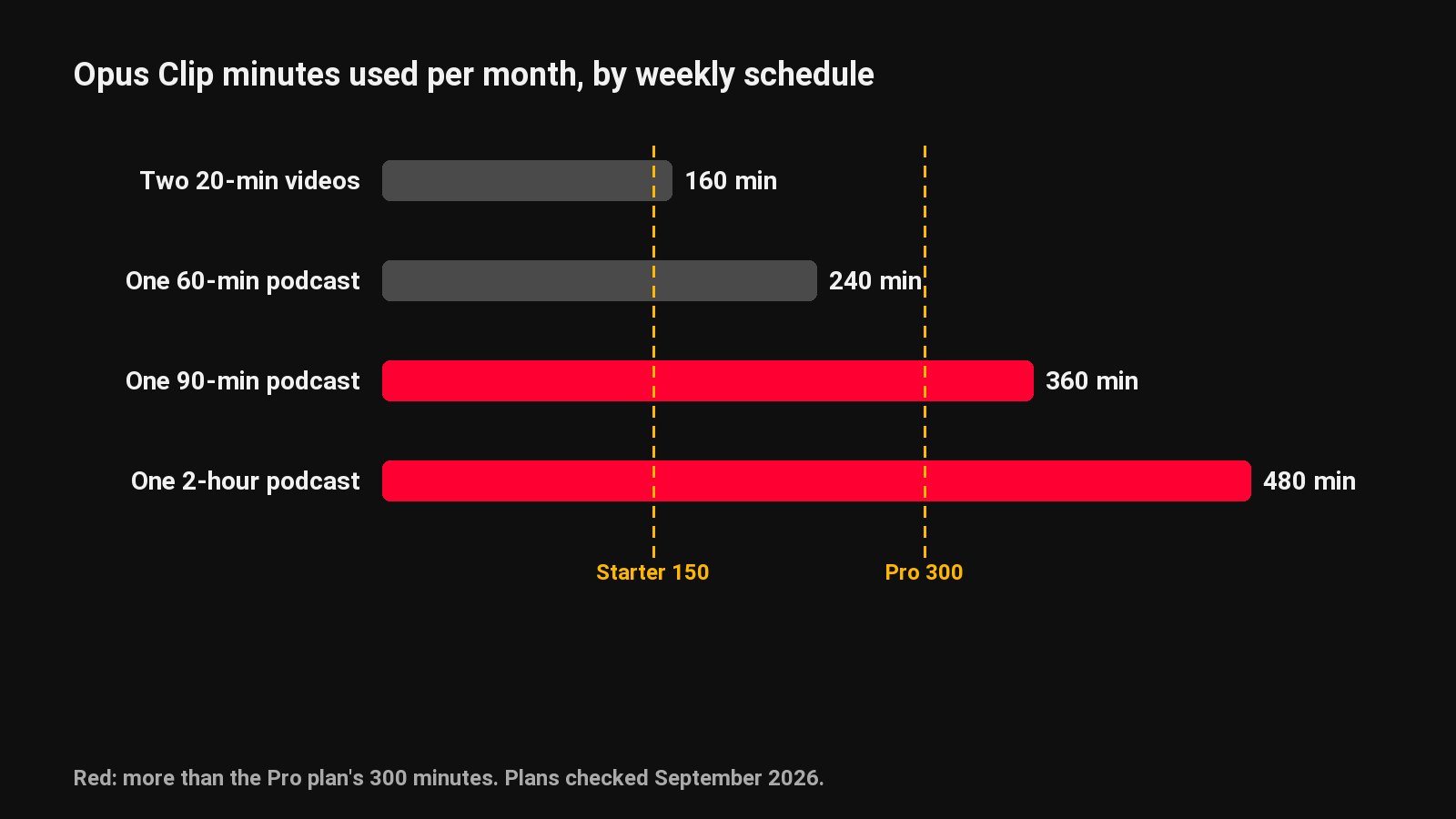
This is the difference most people come here for. Both tools count the minutes you upload, so a 60-minute episode uses 60 minutes. ClipFlame includes more of them: Starter gives 4 hours for $19, where Opus Clip Starter gives 2.5 hours for $15, and Pro gives 20 hours for $39, where Opus Clip Pro gives 5 hours for $29. On ClipFlame, failed jobs don't count against your hours.
| Your schedule | Hours a month | ClipFlame | Opus Clip |
|---|---|---|---|
| Weekly 60-minute podcast | 4 to 5 | Starter, $19 ($16 yearly) | Pro, $29 |
| Weekly 90-minute podcast | 6 to 7.5 | Pro, $39 ($32 yearly) | Pro, $29, plus extra minutes |
| Weekly 2-hour podcast | 8 to 10 | Pro, $39 ($32 yearly) | Pro, $29, plus extra minutes |
| Two 60-minute videos a week | 8 to 10 | Pro, $39 ($32 yearly) | Pro, $29, plus extra minutes |
| Weekly 3-hour stream | 12 to 15 | Pro, $39 ($32 yearly) | Pro, $29, plus 7 or more hours of extra minutes |
Hours reset every 30 days, so a weekly show has four episodes in most periods and five in some. Starter's 4 hours covers four one-hour episodes. The longer your episodes, the wider the gap: Opus Clip Pro's 5 hours run out after two or three long episodes, while ClipFlame Pro's 20 hours cover a weekly 3-hour stream, each one in a single upload. Our Opus Clip pricing guide goes through every Opus Clip plan.
Virality scores and clip picking
Both tools read the transcript, pick the moments that stand on their own, and score them. In ClipFlame, every clip gets a score from 0 to 100 for how likely it is to hold attention. Clips come back sorted best first, and anything scoring 80 or more is highlighted, so you can post the strongest ones without watching all twenty.
ClipFlame is strict about edges. Every clip starts and ends on a full sentence and has to make sense without the rest of the video. Clips run 15 to 90 seconds, most of them 20 to 60, which is the range that holds attention on Shorts, Reels and TikTok. You can nudge any start or end, fix a word or switch the caption style, then re-render for free, up to 30 times per video.
Captions, formats and brand kit
Each ClipFlame clip comes with word-by-word captions in seven styles, three of them in your brand colour. Clips export in 9:16 for Shorts, Reels and TikTok, 4:5 and 1:1 for feeds. The brand kit adds your watermark, an end card and a default caption colour to every clip.
Captions come in the spoken language, detected automatically: English, Spanish, Portuguese, French, German, Italian, Dutch, Russian and Hindi, with proper Devanagari script for Hindi. You can also translate the captions into any of the other eight.
Posting
ClipFlame's scheduler is on every plan, including the free trial. Connect YouTube, Instagram, TikTok and Facebook once, put each clip on the calendar, and it goes out at that time with a title, caption and hashtags written for that platform. Starter includes 150 scheduled posts a month and Pro 750, enough for every clip on every platform. Opus Clip's scheduler is on its Pro plan.
Pro also lets you run up to three brands under one login, each with its own clips, accounts and brand kit. That suits agencies and creators with more than one show.
Which should you pick?
| If you... | Pick |
|---|---|
| Publish episodes or streams of an hour or more | ClipFlame: 20 hours a month on Pro, long streams in one upload |
| Want scored clips, best first | ClipFlame scores every clip on every plan |
| Want clips scheduled on the cheaper plan | ClipFlame includes the scheduler from Starter, and in the free trial |
| Run several shows or client brands | ClipFlame Pro: 3 brands under one login |
| Create in Hindi or another of the 9 languages | ClipFlame, with captions in the right script |
The fastest way to decide is your own footage. Upload your next episode to ClipFlame's free trial: your first 10 minutes of video, every feature and no card.
Weighing other tools too? See our Opus Clip alternatives roundup, or compare ClipFlame vs Vizard.
Common questions
Is ClipFlame cheaper than Opus Clip?
For podcasts and long videos, yes. Four one-hour episodes a month fit ClipFlame Starter at $19 a month ($16 billed yearly), while Opus Clip needs Pro at $29, because its $15 Starter covers 2.5 hours. A weekly two-hour show fits ClipFlame Pro's 20 hours at $39; on Opus Clip it needs Pro plus extra minutes.
Does ClipFlame have a virality score like Opus Clip?
Yes. Every ClipFlame clip gets a 0-100 score, clips are sorted best first, and clips scoring 80 or more are highlighted. It's on every plan, including the free trial.
How many clips does ClipFlame make from one video?
Up to 20 per video, each one a complete thought that starts and ends on a full sentence. A one-hour episode usually gives a week or two of daily clips.
Does ClipFlame have a watermark on the free trial?
No. The free trial covers your first 10 minutes of video, with every feature and 10 scheduled posts.
Can I switch from Opus Clip to ClipFlame easily?
Yes. There's nothing to migrate: upload your next episode to ClipFlame's free trial and compare the clips side by side.