Podcast clip maker
On this page
ClipFlame is a podcast clip maker that turns each video episode into captioned vertical clips. It reads the whole conversation, picks the moments that land without context, frames the people on camera, and adds word-by-word captions. Pro gives 20 hours of video a month, enough for a two-hour show twice a week.
Clips are how most people find a podcast now. Someone sees 40 seconds of your guest saying something sharp, follows, and comes back for the full episode. The catch is that finding those 40 seconds in a 90-minute recording takes longer than recording it did. That's the part a podcast clip maker takes off your plate.
Built for how podcasts are recorded
Long episodes, plenty of hours. ClipFlame counts the minutes you upload, like most AI clip tools, but gives you more of them: 4 hours a month on Starter for $19, and 20 hours on Pro for $39. OpusClip's $29 Pro plan gives 5 hours.
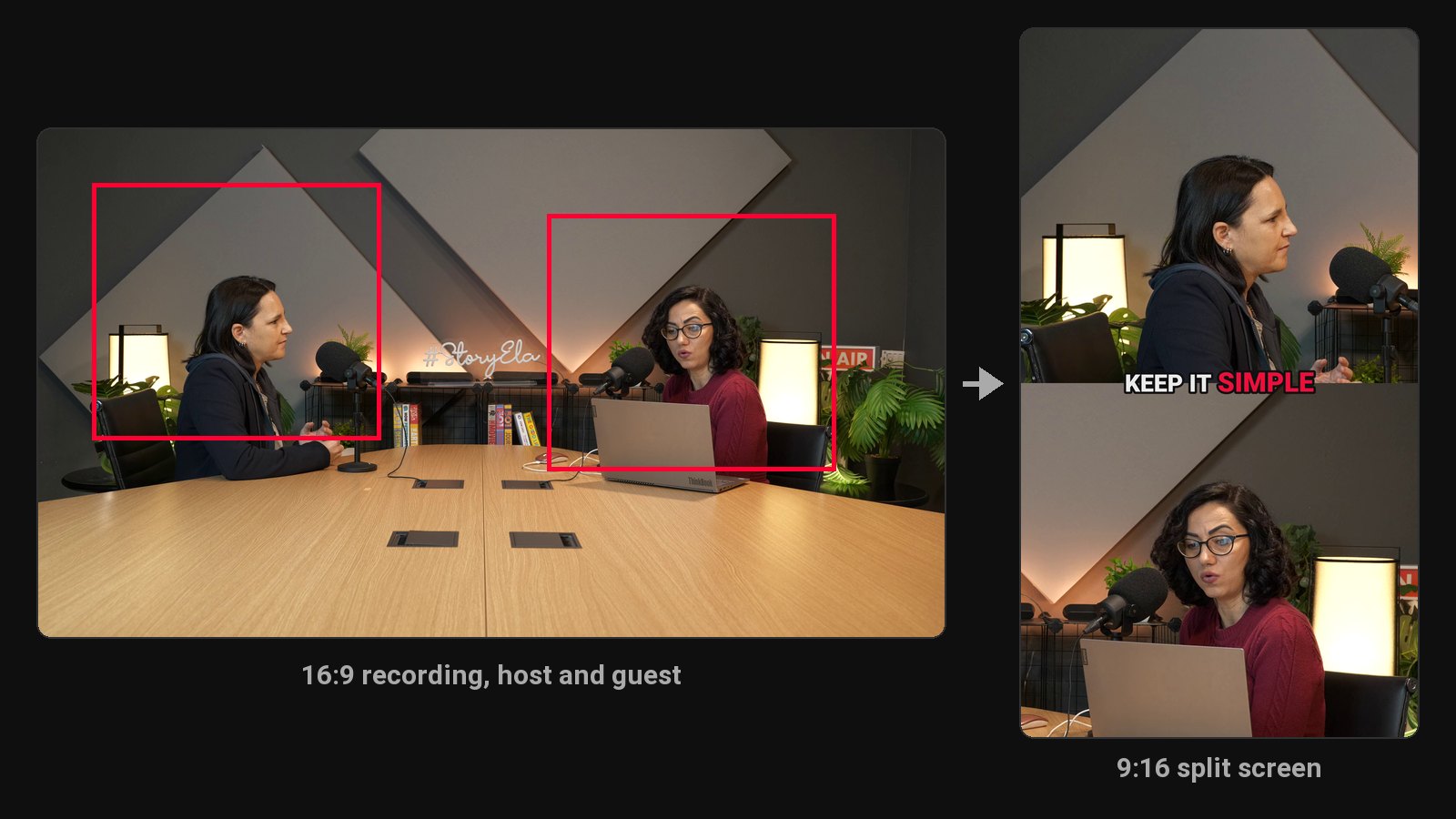
Two people on camera. The vertical crop follows the camera's cuts, centring on whoever is in each shot. When host and guest share a wide shot and sit too far apart for one vertical frame, the clip switches to a split screen, one person on top and one below, so nobody ends up as half a face at the edge.
Moments that make sense to strangers. Podcast conversations meander. The picker looks for complete thoughts with a strong first line: a hot take, a number that surprises, a story with a punchline. It skips anything that relies on "like I said earlier".
Clean edges. Every clip starts and ends on a full sentence, 15 to 90 seconds long, mostly 20 to 60. Filler words and long pauses inside each clip are cut too, so conversational clips feel tight.
What you get from each episode
On every plan:
- Vertical clips with burned-in, word-by-word captions in seven styles
- An editor to adjust clips and re-render for free, and a ZIP download
On every plan:
- The scheduler: each clip posted to YouTube, Instagram, TikTok and Facebook at the time you pick
- Brand kit: your watermark and end card on every clip
Podcasts in 9 languages
ClipFlame detects the spoken language on its own and writes captions in that language: English, Spanish, Portuguese, French, German, Italian, Dutch, Russian and Hindi. Hindi gets a font that renders conjuncts properly, which a lot of caption tools get wrong.
What it costs for a real schedule
| Your show | ClipFlame | Per-minute tools |
|---|---|---|
| Weekly, 60 minutes | Starter, $19/mo | 240 min/mo, usually a $29 plan |
| Weekly, 2 hours | Pro, $39/mo | 480 min/mo, a $29 plan plus extra minutes |
| Twice a week, 90 minutes | Pro, $39/mo | 720 min/mo |
For detail on the per-minute side, see Opus Clip pricing.
What you need
Ideally a video recording of the episode: video clips reach far more new listeners. If you record remotely, export the combined video (or the speaker-view recording) from your recording tool and upload that. Audio-only shows work too: upload the MP3, M4A or WAV, and each clip uses your episode artwork with a waveform and captions. You can also paste a Google Drive or Dropbox link.
Tip: upload the final edit, not the raw recording. The picker works best when the dead air and false starts are already gone.
The workflow, start to finish
- Record and edit the episode as usual.
- Upload it to ClipFlame.
- Review the clips. Drop any you don't like, nudge edges, fix names in the captions.
- Publish the full episode.
- Schedule one or two clips a day through the week. See how to make podcast clips that get watched for what to post first.
Clips grow the audience that sponsors, memberships and your own products depend on. See how to make money from a podcast.
Common questions
Does ClipFlame tell me which clips are best?
Yes. Every clip gets a virality score from 0 to 100, clips come sorted best first, and clips scoring 80 or more are highlighted. Each video gives up to 20 clips, so you can post the strongest first.
What's the best podcast clip maker?
It depends on your show. For long episodes, compare the cost per hour of video: ClipFlame Pro gives 20 hours for $39, under $2 an hour, while OpusClip Pro gives 5 hours for $29. ClipFlame also posts the clips to your accounts on a schedule. Our AI clip generator comparison covers each.
Can it make clips from an audio-only podcast?
Yes. Upload the MP3, M4A or WAV and each clip becomes an audiogram: your episode artwork (taken from the file's cover art), a waveform and word-by-word captions. Without artwork, it uses a gradient in your brand colour. Video clips still reach more new people, so record video if you can.
How many clips will I get per episode?
It varies with the conversation. A dense, opinionated hour usually gives plenty; a slow one gives fewer. You pay for the minutes of the episode, not the clips, so the count doesn't change the price.
Will it get my guest's name right in the captions?
Usually, but names are the most common transcription mistake. Fix any word in the editor and re-render for free.