TikTok scheduler
On this page
ClipFlame's TikTok scheduler posts your videos to TikTok at the times you pick, through TikTok's official Content Posting API. Connect your account once, put clips on the calendar with their captions and settings, and they go out on their own, whether or not you're online. The same clip can go to Instagram Reels, YouTube Shorts and Facebook. The free trial includes 10 scheduled posts.
What it posts to TikTok
- Videos, MP4 or MOV: clips ClipFlame cut from your long video, or finished videos you upload.
- Captions of up to 2,200 characters, including hashtags and mentions. ClipFlame writes one for each clip from what was said; edit it freely.
- Your settings for each post, as TikTok requires. You choose who can watch from the options TikTok gives your account, and turn comments, duets and stitches on or off. You also mark branded or promotional content.
TikTok doesn't accept a custom thumbnail through its API, but you can choose which frame of the video becomes the cover.
How scheduling works
- Connect TikTok from the Calendar page with TikTok's own sign-in. ClipFlame never sees your password.
- Pick a clip or upload a video, and tick TikTok and any other platforms.
- Set the caption, who can see it, and comment, duet and stitch.
- Choose a time in your own time zone. The best time to post on TikTok calculator suggests slots for each day.
- Done. At that time ClipFlame uploads the video to TikTok. The calendar links to the live post, or tells you why it failed so you can resend it.
Why use it instead of TikTok Studio
TikTok Studio can schedule from a computer, one video at a time and only a limited number of days ahead. ClipFlame lets you:
- Plan weeks of clips in one sitting from a single recording. Creator Rewards only pays for videos over a minute, which suits clips cut from podcasts and talks. See the TikTok money calculator.
- Send each clip everywhere without uploading it four times: Instagram, YouTube and Facebook.
- Move posts by dragging them on the calendar.
Pricing
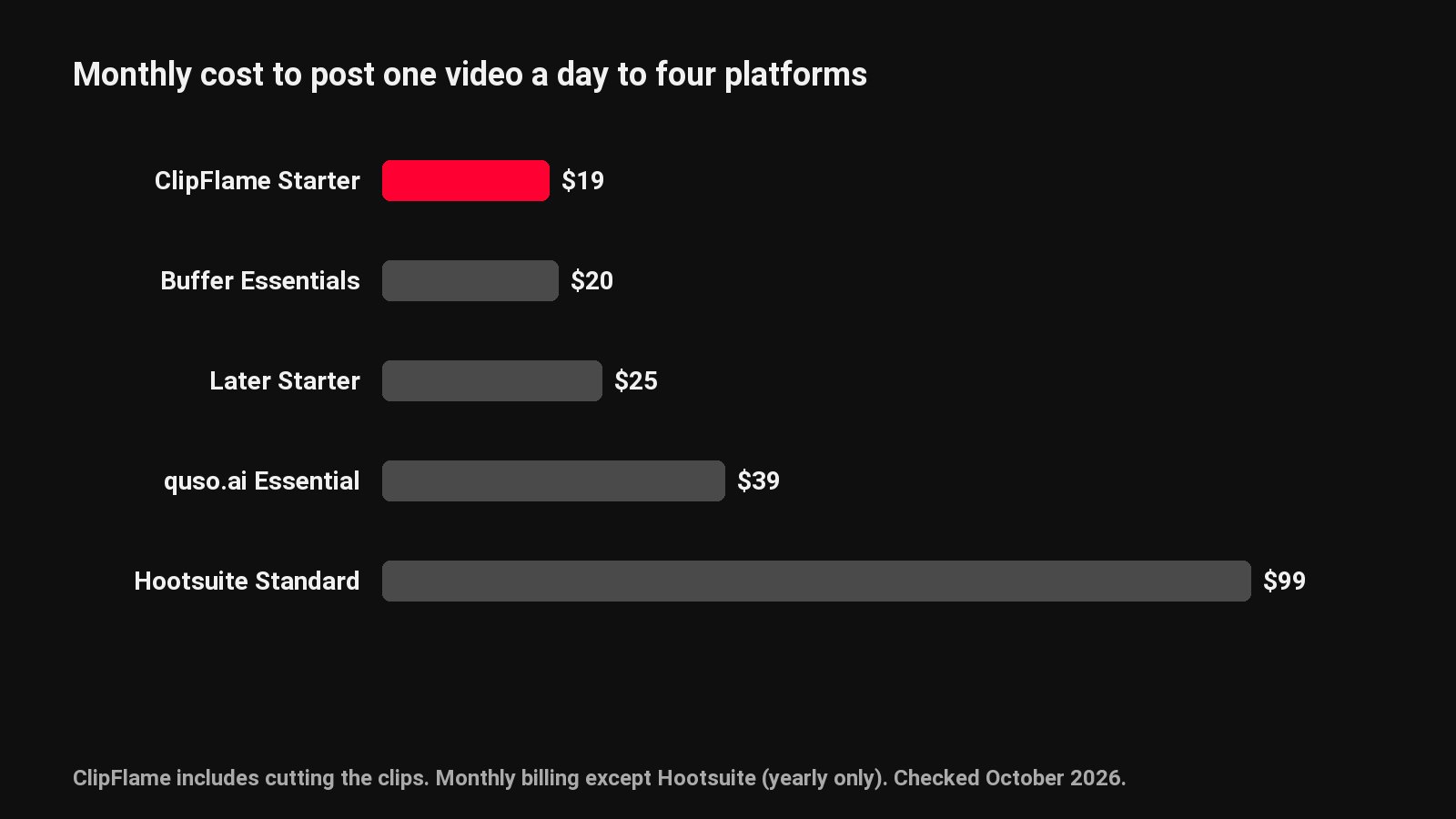
Scheduling is included on every plan. The free trial gives you 10 posts. Starter is $19 a month ($16 billed yearly) with 150 posts a month, and Pro is $39 ($32 yearly) with 750 posts and up to 3 brands. There's no charge per account or per post.
For TikTok's own scheduling tools, read how to schedule TikTok posts. For everything the scheduler does, see the social media scheduler.
Common questions
Is the TikTok scheduler official?
Yes. It posts through TikTok's Content Posting API, with the privacy, comment, duet and stitch choices TikTok requires for each post.
How far ahead can I schedule TikToks?
As far as you like on the ClipFlame calendar. TikTok Studio's own scheduler stops at 10 days.
Can I pick the TikTok cover?
You choose which frame of the video becomes the cover. TikTok's API doesn't accept a separate image.
Do I need a TikTok Business account?
No. Personal and Business accounts both connect.