AI caption generator
On this page
ClipFlame's AI caption generator burns word-by-word captions into every clip it cuts from your long video. Choose from seven styles (three in your brand colour), in 9 languages detected automatically, and fix any word in the editor before re-rendering for free.
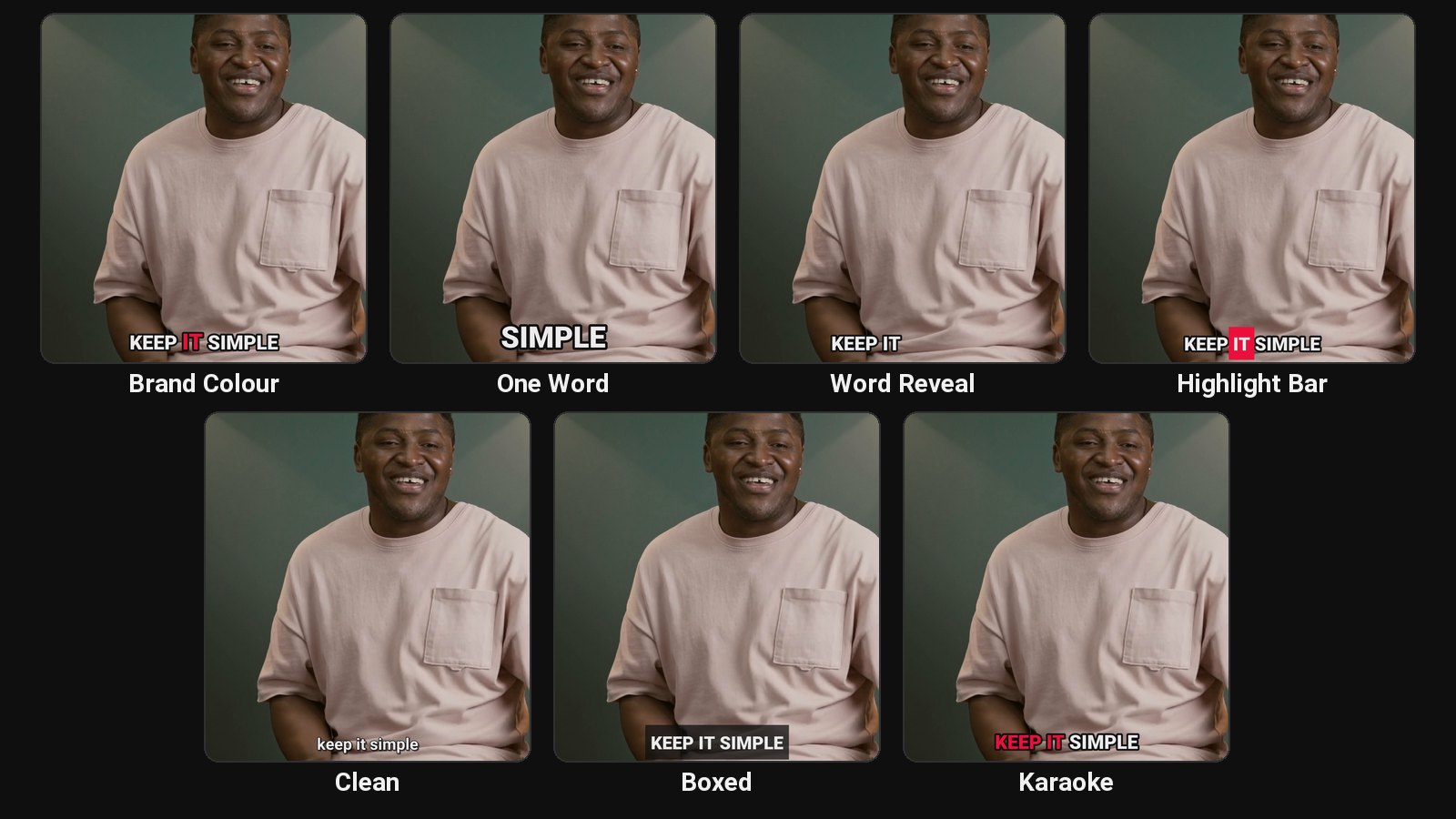
ClipFlame captions the clips it makes. It isn't a subtitle tool for full-length videos: if you need an SRT file for a 60-minute YouTube upload, YouTube Studio's own captions are the better route. See how to add captions to a video for both.
Seven caption styles
| Style | What it does | Good for |
|---|---|---|
| Brand Colour | Bold caps, the spoken word highlighted in your colour and popping in | Your default, on-brand look |
| One Word | One big word at a time | High-energy talking clips |
| Word Reveal | Words appear as they're spoken | Storytelling |
| Highlight Bar | The spoken word sits on a coloured bar | Punchy, easy to follow |
| Clean | Bold sentence case with a soft shadow | Calm, serious topics |
| Boxed | Text on a dark box | Busy backgrounds, older audiences |
| Karaoke | Words fill with colour as they're spoken | Music-like pacing |
See them in motion in the caption styles section. For the Alex Hormozi look, see Hormozi-style captions.
Placed for short-form
Captions sit above the lower part of the frame, where TikTok, Reels and Shorts put their buttons and description. On two-person split screens, captions sit on the line between the two panels instead of over a face.
9 languages, detected automatically
English, Spanish, Portuguese, French, German, Italian, Dutch, Russian and Hindi. Hindi uses a font that renders conjuncts and vowel signs properly, a common failure in caption tools.
Language pages: English, Spanish, Portuguese, French, German, Italian, Dutch, Russian and Hindi.
Translated captions
Pick a language under "Captions in" before you start, and ClipFlame translates every clip's captions into it. An English podcast can get Spanish captions, a Hindi talk English ones. The translated words still light up in time with the speaker, and the title, caption and hashtags are written in the same language. The voice stays as recorded. More on the caption translator page.
Fix anything
Names, brands and jargon are where every speech-to-text tool slips. In ClipFlame's editor, click a word, correct it, and re-render. Re-renders are always free.
Pricing
Captions come with every clip on every plan: Starter $19/month for 4 hours of video a month, Pro $39/month for 20 hours. First 10 minutes free.
Common questions
Does ClipFlame tell me which clips are best?
Yes. Every clip gets a virality score from 0 to 100, clips come sorted best first, and clips scoring 80 or more are highlighted. Each video gives up to 20 clips, so you can post the strongest first.
Can I caption a video I've already cut?
ClipFlame is built to cut clips from long videos and caption them. For a single short video you've already cut, a caption app like CapCut or Submagic is quicker.
Can I use my own font?
Not yet. Styles use Roboto, chosen for readability, with Noto Sans Devanagari for Hindi. Your brand colour applies to three styles.
Are the captions burned in?
Yes. Burned-in captions show on every platform, including when a clip is reshared.