Facebook scheduler for Page videos
On this page
ClipFlame's Facebook scheduler posts videos to the Facebook Pages you manage at the times you pick. Connect with Facebook Login once and every Page you manage, plus its linked Instagram account, becomes available. Put a clip on the calendar, check the title and caption, and it posts on its own, with the same clip going to YouTube, Instagram and TikTok if you want.
What it posts
- Videos on Facebook Pages, from clips ClipFlame cut from your long video or any MP4 or MOV you upload.
- A title and description for each video. ClipFlame writes both from the clip, and you can edit them.
- A custom thumbnail, if you add one.
Facebook only lets apps post to Pages, not personal profiles or groups. Most creators and businesses already have a Page; if you don't, you can create one in a few minutes.
How scheduling works
- Connect Facebook from the Calendar page. One sign-in connects your Pages and their Instagram accounts.
- Pick a clip or upload a video, and tick the Page and any other platforms.
- Check the title and description.
- Choose a time. Facebook does best on weekday mornings. The best time to post on Facebook calculator shows each day's slots.
- Done. It posts at that time, and the calendar links to the live video or tells you why it failed.
Why not Meta Business Suite
Meta Business Suite only covers Facebook and Instagram, and you bring finished videos. ClipFlame puts YouTube and TikTok on the same calendar, and makes the clips for you. ClipFlame finds the best moments in a long video, frames the speaker, and adds captions. See the Facebook Reels maker.
Pricing
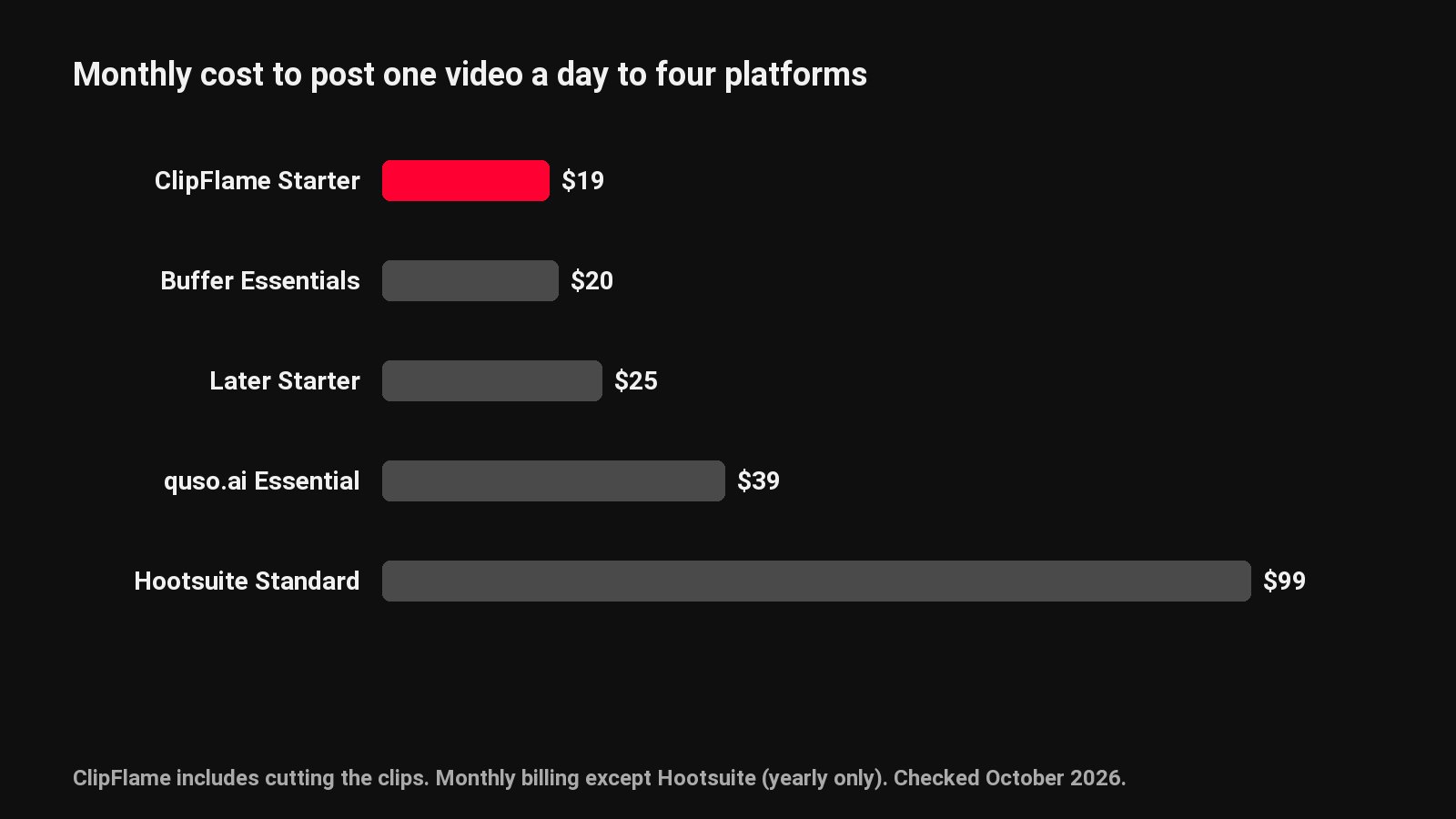
The free trial includes 10 scheduled posts. Starter is $19 a month ($16 billed yearly) with 150 posts, and Pro is $39 ($32 yearly) with 750 posts and up to 3 brands, each with its own Pages and accounts. For Facebook's own tools, see how to schedule Facebook Reels. For the rest, see the social media scheduler and the Instagram scheduler.
Common questions
Can I schedule videos to my personal Facebook profile?
No. Facebook only lets apps post to Pages. Most creators and businesses already have one, and creating a Page takes a few minutes.
Can the same clip go to Instagram too?
Yes. One Facebook sign-in connects your Pages and their linked Instagram accounts, and you can tick YouTube and TikTok as well.
How many posts are included?
10 on the free trial, 150 a month on Starter and 750 on Pro.