Long video to short videos
On this page
To turn a long video into short videos, find 5 to 10 moments that make sense on their own, cut each one so it starts and ends on a full sentence, reframe it to 9:16 with the speaker centred, and add word-by-word captions. You can do it by hand in an editor like CapCut, or let an AI clip tool do the finding and cutting for you.
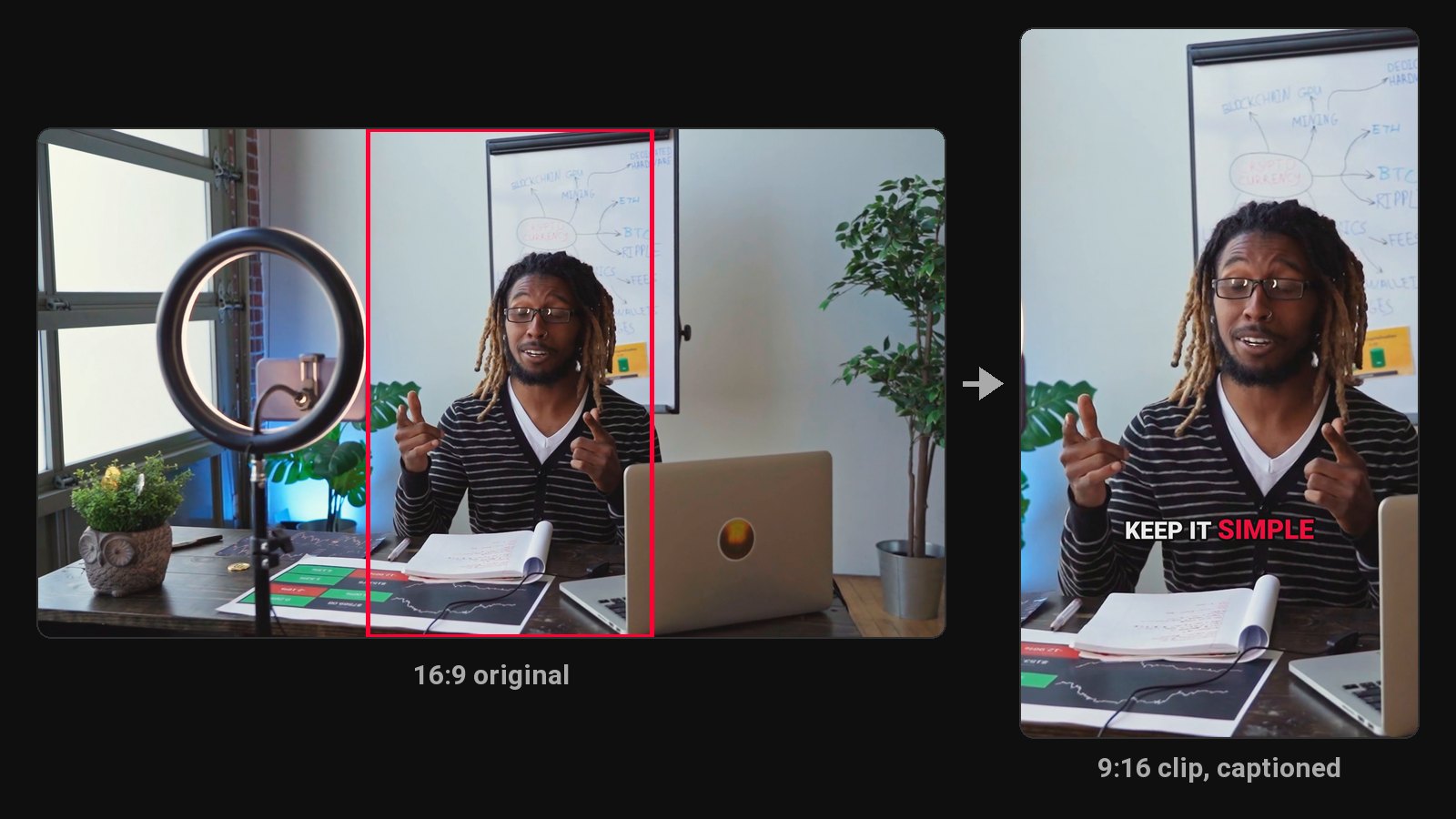
That's the whole recipe. The hard part is step one. Cropping and captioning are mechanical, and any decent tool handles them. Picking the moment that makes a stranger stop scrolling is where most clips die.
This guide walks through all four steps, what goes wrong at each, and when it's worth handing the job to software.
Why short clips from long videos work
You already did the expensive part. A 60-minute podcast or a 20-minute YouTube video is full of 30-second stretches where someone says something sharp, funny or surprising. Nobody finds those moments inside the full upload, because almost nobody watches the full upload.
Short clips put those moments in front of people who don't know you yet. YouTube Shorts, Instagram Reels and TikTok all push vertical video to viewers who don't follow you. A good clip then points back to the long video, which is where you earn watch time, trust and (if you sell something) customers.
And one recording can feed a week of posts. That's the maths that makes clipping worth doing at all: one hour of recording, seven or eight posts.
Step 1: Find the moments worth clipping
Here's the test we use when we pick clips: would this make sense to someone who scrolled into it cold? No context, no intro, no "as I said earlier". If the answer is no, it's not a clip.
Moments that usually pass the test:
- A strong opinion. "Most people price their coaching too low, and it's not a confidence problem."
- A surprising number. "We lost 40% of our listeners the week we moved to video."
- A short story with a punchline. Setup, tension, payoff, all inside 60 seconds.
- A clear answer to a question people search for. "Here's how long a Short can be."
Moments that fail: inside jokes, anything that references a slide nobody can see, the first five minutes of small talk, and long lists ("and the seventh thing is...").
What goes wrong: people clip the parts they enjoyed recording. The funny tangent with your co-host is great in the full episode. Cold, it's two people laughing at something the viewer missed.
How to find them faster
Don't rewatch the video. Read it. Get a transcript (YouTube's auto captions, your editor's transcription, or any speech-to-text tool) and skim it for the lines that would work as a headline. Reading an hour of transcript takes 10 to 15 minutes. Watching it takes an hour, and you'll zone out halfway.
Mark the opening line of each candidate. If the first sentence doesn't hook, look a sentence or two later. Often the real hook is the second sentence and the first one is throat-clearing.
Step 2: Cut each clip on full sentences
Most good clips run 20 to 60 seconds. YouTube now accepts Shorts up to three minutes, but a longer limit isn't a target. Cut to the length the idea needs, then stop.
Two rules for clean cuts:
- Start on the hook, not the breath before it. Trim the "so, um, yeah" that opens most answers. The first word on screen should be the first word of the idea.
- End on a full sentence. A clip that ends mid-thought feels broken and people swipe before the end. That kills the completion rate, which is one of the clearest signals short-form feeds read.
When we built ClipFlame's clip picker, this was the rule we enforced hardest: every clip starts and ends on a full sentence, and has to make sense without the rest of the video. It rejects more candidates than any other check.
What goes wrong: cutting to a round number. "Let's make it 30 seconds" produces clips that end three words before the punchline.
Step 3: Reframe to vertical
Your long video is probably 16:9. Shorts, Reels and TikTok want 9:16. A plain centre crop throws away about two-thirds of the frame, and in a two-person podcast that usually means cutting one person out entirely.
Your options:
- Manual keyframes. Move the crop by hand every time the speaker moves or the conversation switches. Accurate, slow.
- Auto reframe. Most AI clip tools (ClipFlame included) track the face and keep the person who's talking centred, even when they lean or walk.
- Split screen. For two-person conversations, stack both speakers top and bottom. It works well for debates and interviews.
Also decide where the clip will run. 9:16 fills the screen on Shorts, Reels and TikTok. 4:5 takes up more of the feed on Instagram and Facebook, and 1:1 looks the same on phone and desktop. You can see all three side by side on ClipFlame's formats section.
Step 4: Add captions
A lot of people scroll with the sound off, so a talking-head clip without captions is a silent face moving its mouth. Captions aren't decoration here. They're the clip.
What works on short-form:
- Word-by-word timing. Captions that appear as each word is spoken hold attention better than full-sentence subtitles.
- Big, bold text in the middle third. The bottom of the screen is covered by the app's buttons and the post caption.
- One highlight colour for the word being spoken. Pick a brand colour and stick to it so your clips look like yours.
We cover tools and settings in detail in our guide on how to add captions to a video.
What goes wrong: auto captions that misspell names and jargon. Always read through before you post. A wrong word in giant yellow letters is the one mistake everybody notices.
Doing it by hand in CapCut (or any editor)
If you're doing one or two clips a week, a free editor is fine. Rough workflow in CapCut or a similar tool:
- Import the full video and generate captions for the whole thing, so you can search the text.
- Split out each moment you picked in step 1.
- Change the canvas to 9:16 and keyframe the crop to follow the speaker.
- Apply auto captions to each clip, fix the errors, style them.
- Export each clip, then write a title and caption for each post.
Budget roughly 15 to 30 minutes per finished clip once you're practised. For eight clips a week, that's half a working day.
Doing it with an AI clip tool
AI clip tools collapse steps 1 to 4 into an upload. You give them the long video, they read the transcript, pick moments, cut, reframe and caption. You review, fix, and download.
They're worth it when:
- You publish a long video every week or more.
- Your videos are mostly people talking (podcasts, interviews, coaching, commentary). Clip tools read speech, so they struggle with footage where the story is visual.
- Your time is worth more than the subscription.
They're not worth it for a one-off, or for highly visual content like gaming, sports and cooking where the moment is something you see, not something someone says. Gaming is the exception for ClipFlame: its gaming mode also reads the sound, the chat and the screen.
The main thing to compare is how many hours of video a plan includes. Most tools bill by the minute of uploaded video, so a two-hour podcast uses eight times what a 15-minute video does. Opus Clip Starter includes 2.5 hours a month for $15 and Vizard Creator 10 hours for $29. ClipFlame Starter includes 4 hours for $19, and Pro 20 hours for $39. We break down the options in our roundup of AI clip generators.
Don't forget the long video
Clipping is half the job. The full upload still needs chapters with timestamps, a description and tags that help it get found, and a thumbnail. Do it before the clips go out: your clips send people back to the long video, and it should be ready for them.
Posting the clips elsewhere too? See YouTube to TikTok, the Instagram Reels maker, the Facebook Reels maker and the YouTube clip maker.
Common questions
How many clips can I get from one long video?
From a 60-minute conversation, 5 to 10 strong clips is normal. You can find more, but quality drops fast after the first ten. Post the best ones first.
Can I turn a YouTube link into Shorts?
Only if it's your video. Downloading someone else's video breaks YouTube's terms and probably their copyright. For your own videos, upload the original file, which also gives you better quality than a re-download.
What's the best length for a clip?
The shortest length that tells the whole idea. For most talking clips that's 20 to 60 seconds. See our breakdown of YouTube Shorts length limits for the platform rules.
How often should I post the clips?
One a day from a weekly episode is a sustainable pace. Spread them out rather than posting all eight on the same day. Our guide to the best time to post Shorts explains how to pick the slot.