Best AI clip generators in 2026
On this page
The best AI clip generator in 2026 is ClipFlame for podcasts, interviews and talking videos: it finds up to 20 clips per video, scores each one for virality, cuts them on full sentences, captions them word by word and schedules them to four platforms, from $19 a month for 4 hours of video. The other six worth knowing: Opus Clip, Vizard, Klap, quso.ai, Submagic and CapCut.
An AI clip generator takes a long video you already recorded (a podcast, interview, webinar or YouTube video), reads what's said, picks the moments worth posting and cuts them into vertical clips with captions. Don't confuse these with AI video generators like Veo or Sora, which invent footage from a prompt. A clip generator works from your own recording, which is why it's the tool podcasters and YouTubers actually need.
Disclosure: we make ClipFlame. Prices come from each tool's pricing page, checked in October 2026, monthly billing unless noted.
Our top picks at a glance
| Rank | Tool | Best for | How you pay | Paid from | Virality score | Scheduling | Free option |
|---|---|---|---|---|---|---|---|
| 1 | ClipFlame | Podcasts and talking videos, clips plus posting | Per minute, 4 h a month | $19/mo ($16 yearly) | Yes, every clip | Every plan | First 10 minutes free |
| 2 | Opus Clip | Short and medium videos | Per minute | $15/mo (150 min) | Yes | Pro, $29/mo | Free plan, watermarked |
| 3 | Vizard | Lots of footage each month | Per minute | $29/mo (600 min) | Yes | Yes | 60 min/mo, 720p, watermarked |
| 4 | Klap | Many videos, a few clips each | Per clip | $14/mo billed yearly (100 clips) | Yes | Yes | Not listed |
| 5 | quso.ai | A wider social media suite | Credits | $29/mo (100 credits) | Yes | Essential, $39/mo | 75 credits/mo |
| 6 | Submagic | Captions on videos that are already short | Per short video, plus add-on | $19/mo + $19 Magic Clips | Not listed | Not listed | Free trial |
| 7 | CapCut | Hand-editing one or two clips | Free editor | Free (Pro $19.99/mo) | No | Not listed | Yes |
How we compared them
We compared every tool against the same job, clipping a one-hour, two-person podcast episode recorded on video, using each tool's published plans and features. Six things decide it, in this order:
- Pricing model. Minutes of video, clips or credits. On long episodes the monthly allowance decides your bill more than the headline price.
- Clip quality on talking videos. Does each clip start and end on a full sentence, and make sense to someone who hasn't seen the episode?
- Ranking. Does the tool tell you which clips to post first?
- Finishing. Captions, vertical framing and branding, ready to post without another editor.
- Posting. Can it schedule the clips to your accounts, and on which plan?
- Free option. Can you test it on a real episode for free?
The weekly podcast is the test case because it's where these tools differ most. A 10-minute YouTube video costs about the same everywhere. A two-hour interview doesn't.
What a weekly podcast costs on each
| Weekly schedule | ClipFlame | Opus Clip | Vizard | Klap | quso.ai |
|---|---|---|---|---|---|
| One 60-minute episode (240 min) | $19 | $29 (Pro) | $29 (Creator) | $14, billed yearly | $39 (Essential) |
| One 2-hour episode (480 min) | $39 (Pro) | $29 + extra minutes | $29 (Creator) | $14, billed yearly | $49 (Growth) |
| Two 60-minute episodes (480 min) | $39, 3 brands | $29 + extra minutes | $29 (Creator) | $39, billed yearly, if clips pass 100 | $49 (Growth) |
| Scheduling included at that price | Yes | Yes | Yes | Yes | Yes from Essential |
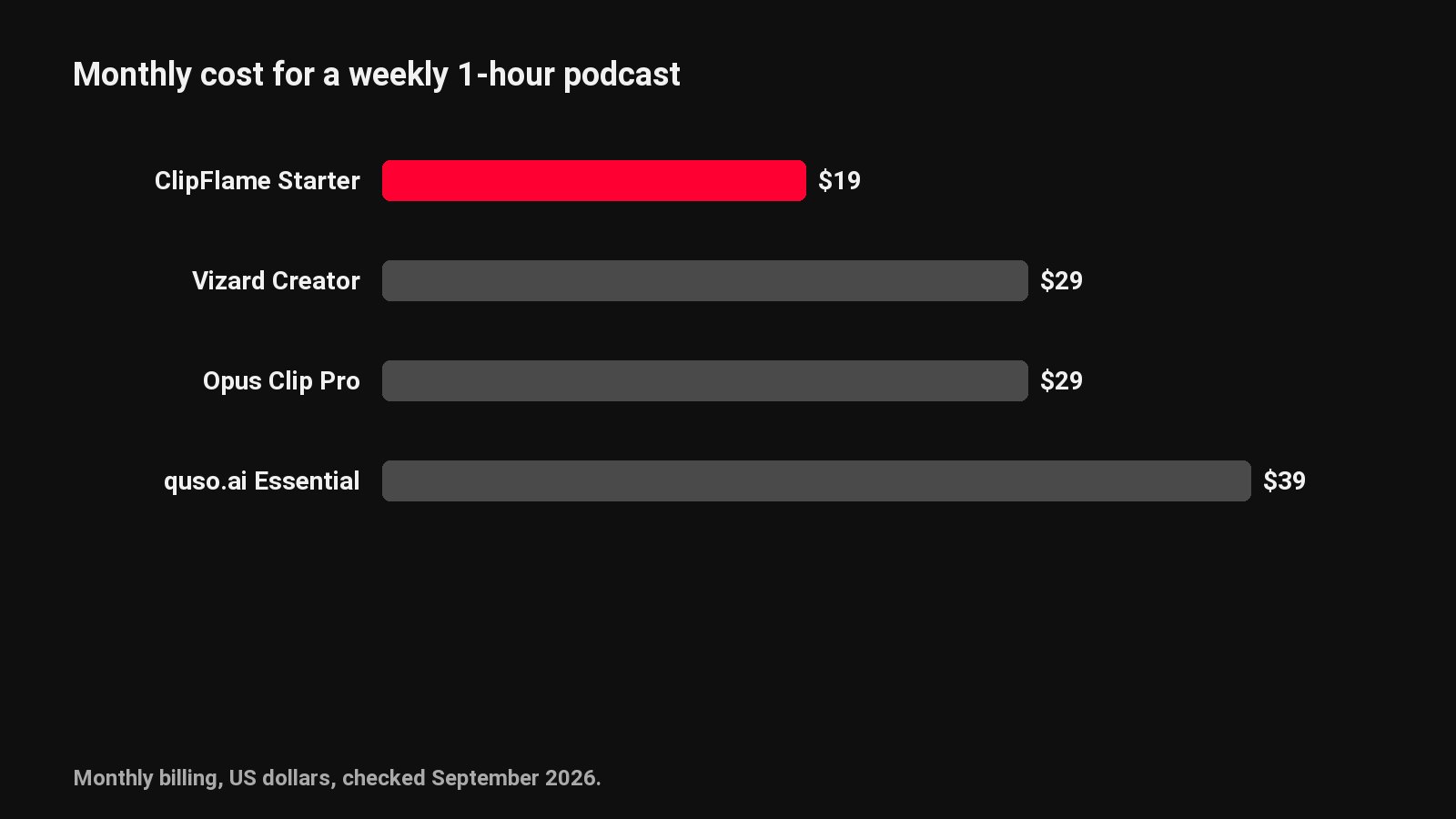
Most of these tools count uploaded minutes, ClipFlame included, so trim the intro chatter and the goodbye before you upload. What differs is how many hours a plan holds. ClipFlame Starter gives 4 hours a month for $19, where Opus Clip Starter gives 2.5 hours for $15. ClipFlame Pro gives 20 hours for $39, against 5 hours for $29 on Opus Clip Pro and 10 hours for $29 to $39 on Vizard, and it takes long streams in one upload. A weekly one-hour show is 4 to 5 hours a month. Per-clip tools charge for clips you throw away.
1. ClipFlame
ClipFlame reads the full transcript, finds every moment that stands on its own, and cuts up to 20 vertical clips per video. Each clip starts and ends on a full sentence, runs 15 to 90 seconds (most land between 20 and 60), and is framed on whoever is talking. When host and guest sit too far apart for one vertical frame, it switches to a split screen.
What stands out:
- A virality score on every clip. Each clip is rated 0 to 100 on its hook, its completeness and its payoff. Clips come back sorted best first, and anything scoring 80 or more is highlighted. You can post the top three without watching all twenty.
- More hours per plan. Starter covers 4 hours of video a month. Pro covers 20 hours and takes long streams in one upload.
- Posting built in, on every plan. The scheduler posts clips to YouTube, Instagram, TikTok and Facebook, with a title, caption and hashtags written for each platform. Starter includes 150 posts a month, Pro 750.
- Captions that look like your channel. Seven word-by-word styles, three in your brand colour, plus a brand kit with your watermark and end card.
- 9 languages, detected automatically, including Hindi in Devanagari script, with caption translation between them.
- Free re-renders. Nudge an edge, fix a word, switch the style, up to 30 times per video.
Pricing: Free trial (10 minutes of video, every feature, 10 scheduled posts). Starter $19/month ($16 yearly) with 4 hours of video a month. Pro $39/month ($32 yearly) with 20 hours, 750 posts and 3 brands.
Best for: weekly podcasts, interviews, coaching calls, webinars and YouTube videos where you want a week of clips posted from one upload. See the AI clip maker and podcast clip maker.
2. Opus Clip
The best-known name in the category. Opus Clip picks moments, scores each clip and adds captions, and Pro adds a scheduler and a team workspace.
- Pricing: Starter $15/month for 150 minutes; Pro $29/month for 300 minutes.
- Free: a free plan with watermarked clips.
- Watch out for: per-minute billing on long shows. A weekly two-hour podcast needs Pro plus extra minutes. See Opus Clip pricing explained and ClipFlame vs Opus Clip.
3. Vizard: best for high monthly volume
Vizard does the same core job with a bigger minute allowance: 600 minutes a month on Creator.
- Pricing: Creator $29/month ($14.50 billed yearly); Business $39/month ($19.50 yearly).
- Free: 60 minutes a month at 720p, watermarked.
- Watch out for: the brand kit and team workspace sit on Business. See ClipFlame vs Vizard.
4. Klap
Klap charges by clips generated rather than minutes uploaded.
- Pricing: Basic $14/month billed yearly for 100 clips; Pro $39/month billed yearly for 300.
- Watch out for: clips you generate and discard still count, and the listed prices need a year up front. See ClipFlame vs Klap.
5. quso.ai
quso.ai (formerly vidyo.ai) bundles clipping, editing and scheduling on one pool of credits, roughly one per minute of video.
- Pricing: Lite $29/month (100 credits), Essential $39 (300), Growth $49 (600). Yearly billing is about a third cheaper and doubles the credits.
- Watch out for: editing and captioning draw from the same credits, and scheduling starts on Essential. See ClipFlame vs quso.ai.
6. Submagic
Submagic is a caption and effects editor for short talking videos. Base plans cap video length at 2 minutes on Starter, 5 on Pro and 30 on Business.
- Pricing: Starter $19/month, Pro $39, Business $69; clipping long videos needs the Magic Clips add-on, $19/month.
- Watch out for: clipping a weekly podcast costs about $38 a month. See ClipFlame vs Submagic.
7. CapCut
CapCut is a free editor with good auto captions and a basic long video to shorts tool. You'll refine every cut, crop and caption yourself.
- Pricing: free core; Pro $19.99/month.
- Watch out for: 15 to 30 minutes of work per finished clip. Our manual long-to-short guide covers the workflow.
Honorable mentions
- Descript: a text-based editor that pulls clips on its Creator plan ($35/month). Worth it if you edit the full episode there anyway.
- Riverside: records remote guests and includes Magic Clips. Good if you already record there.
- 2short.ai and Spikes Studio: minute-based clippers with smaller feature sets.
Is there a free AI clip generator?
| Free option | What you get | The catch |
|---|---|---|
| ClipFlame free trial | 10 minutes of video, up to 20 scored clips per video, every feature, 10 scheduled posts | 10 minutes, then a paid plan |
| Opus Clip free plan | Monthly free minutes | Watermarked clips |
| Vizard free plan | 60 minutes a month | 720p and a watermark |
| CapCut | A free editor | You find and cut every clip yourself |
There's no fully free AI clip generator without a catch. The best free test is one real episode through ClipFlame's trial: look at the top-scored clips first and judge whether you'd post them.
How to choose
| If you... | Pick |
|---|---|
| Publish a weekly podcast or long interviews | ClipFlame |
| Want clips ranked so you know what to post first | ClipFlame, a score on every clip |
| Want clips scheduled to four platforms on the entry plan | ClipFlame |
| Run several shows or client brands | ClipFlame Pro, 3 brands |
| Create in Hindi or another of 9 languages | ClipFlame |
| Only edit one or two clips a week by hand | CapCut |
For podcasts specifically, our podcast clips guide explains what makes a good pick. Looking at a specific tool? We compare alternatives to Opus Clip, Vizard, Klap, Submagic, Descript, CapCut, SendShort and quso.ai. For captions only, see the best caption generators. For podcasts, see the best podcast clip makers; for Shorts, the best YouTube Shorts makers; and for posting, the best social media schedulers for video.
Common questions
What is the best AI clip generator?
ClipFlame, for podcasts and talking videos. It scores every clip for virality, cuts up to 20 clips per video on full sentences, and schedules them to four platforms, from $19 a month for 4 hours of video.
What is the difference between an AI clip generator and an AI video generator?
A clip generator cuts short clips from a video you already recorded. An AI video generator, like Veo or Sora, creates new footage from a text prompt. For podcasts and talking videos, you want a clip generator.
Is there a free AI clip generator without a watermark?
Most free plans add one. ClipFlame's free trial doesn't: your first 10 minutes of video come out clean, with every feature. Paid plans start at $19 a month for 4 hours of video; Opus Clip's start at $15 for 150 minutes.
Can AI clip generators find viral moments?
They can find moments with the traits viral clips share: a strong first line, a complete thought and a payoff. ClipFlame scores every clip on those traits from 0 to 100, so you post the strongest first. Whether one takes off still depends on your audience and consistency. See how to get more views on Shorts.
Do AI clip generators work for gaming or sports?
Most don't. They read the transcript to find moments, so they're built for talking videos, and in gameplay and sports the key moments are visual. ClipFlame has a gaming mode that also reads loudness, chat and the screen, and puts the streamer's facecam on top. Sports is still a gap.