The best Klap alternatives
On this page
The best Klap alternative is ClipFlame. Klap charges for every clip you generate; ClipFlame charges for hours of video, so each episode gives up to 20 clips at no extra cost, every one scored for virality, captioned and ready to schedule to four platforms. Starter is $19 a month for 4 hours of video, billed monthly. Other options: Opus Clip and Vizard (per minute), quso.ai (credits) and Submagic (short videos).
Klap's model is unusual: it charges by clips generated, not by minutes uploaded. That gets expensive when you want ten or twenty clips from every episode, every clip you generate and discard still counts, and the listed prices need a year up front.
Disclosure: we make ClipFlame. Prices were checked on each tool's pricing page in October 2026.
How clip tools charge
| Model | Tools | You pay for | The catch |
|---|---|---|---|
| Hours of video | ClipFlame | Minutes uploaded: 4 hours a month on Starter, 20 on Pro | None on clip count: up to 20 clips per video |
| Per clip | Klap | Each clip generated | Discarded clips count too |
| Per minute | Opus Clip, Vizard, quso.ai | Every minute uploaded | Opus Clip Pro stops at 5 hours; quso.ai editing uses credits too |
Quick comparison
| Tool | Paid from | Allowance | Virality score | Free option |
|---|---|---|---|---|
| ClipFlame | $19/mo ($16 yearly) | 4 hours, up to 20 clips per video (Pro: 20 hours) | Yes, every clip | First 10 minutes of video free |
| Klap | $14/mo billed yearly | 100 clips (300 on Pro, $39 yearly) | Yes | Not listed |
| Opus Clip | $15/mo | 150 minutes (300 on Pro, $29) | Yes | Free plan, watermarked |
| Vizard | $29/mo ($14.50 yearly) | 600 minutes | Yes | 60 min/mo, 720p, watermarked |
| quso.ai | $29/mo ($19 yearly) | 100 credits, about 1 per minute | Yes | 75 credits/mo |
| Submagic | $19/mo | Short videos; clipping long ones is a $19/mo add-on | Not listed | Free trial |
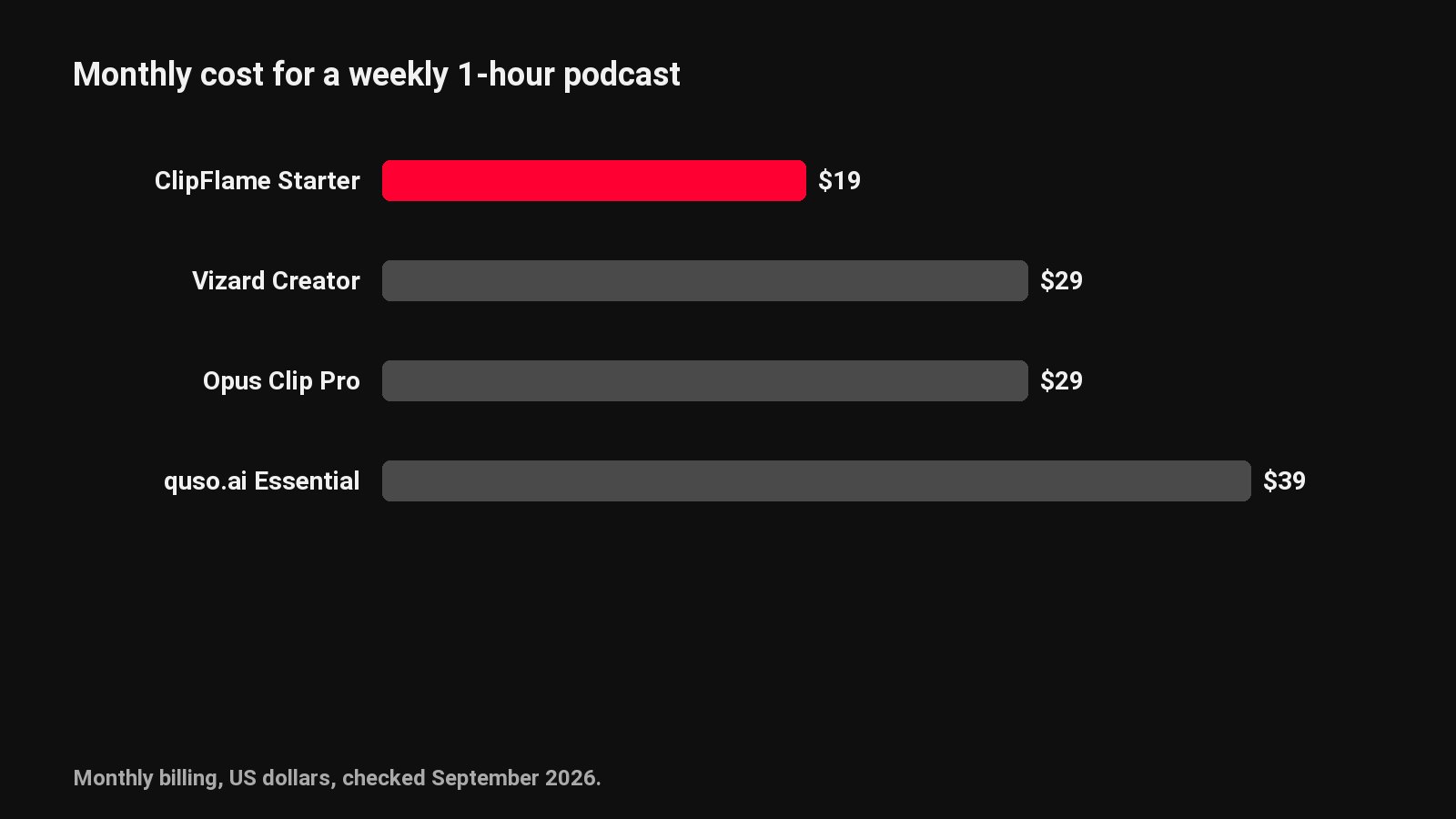
Example: a weekly podcast
That's 4 episodes and 80 clips a month.
| Tool | One-hour episodes (240 min) | Two-hour episodes (480 min) |
|---|---|---|
| ClipFlame | Starter, $19, billed monthly | Pro, $39, billed monthly |
| Klap | Basic, $14 billed yearly, 80 of 100 clips used | Basic, $14 billed yearly, 80 of 100 clips used |
| Opus Clip | Pro, $29 | Pro, $29, plus extra minutes |
| Vizard | Creator, $29 | Creator, $29 |
Regenerate a few clips on Klap and you're at the 100-clip cap. On ClipFlame you can re-render any clip 30 times per video without touching your allowance.
1. ClipFlame
ClipFlame gets every good moment out of a long recording. It reads the whole transcript, cuts up to 20 clips that start and end on full sentences, frames the speaker and adds word-by-word captions. The number of clips never changes the bill.
Why people switch from Klap:
- No clip quota. Up to 20 clips per video, and keeping all twenty costs the same as keeping five.
- Monthly billing on every plan: Starter $19, Pro $39. Yearly drops them to $16 and $32.
- Every clip scored 0-100, sorted best first, with clips scoring 80 or more highlighted.
- Scheduling on every plan to YouTube, Instagram, TikTok and Facebook, with titles and hashtags written per platform.
- Brand kit included: watermark, end card and caption colour, with seven caption styles.
- 9 languages, Hindi included in Devanagari, and caption translation.
- A free trial with every feature: your first 10 minutes of video and 10 scheduled posts.
Pricing: Free trial (first 10 minutes of video). Starter $19/month ($16 yearly) for 4 hours of video. Pro $39/month ($32 yearly) for 20 hours and 3 brands. See plans.
Full comparison: ClipFlame vs Klap.
2. Opus Clip
The best-known clip tool, billed per minute: 150 minutes on Starter ($15), 300 on Pro ($29). Every clip gets a virality score, and Pro adds a scheduler. Read the Opus Clip review or pricing breakdown.
3. Vizard
Vizard's Creator plan includes 600 minutes a month for $29 ($14.50 billed yearly). The free plan is 720p with a watermark, and the brand kit is on Business. See Vizard pricing and Vizard alternatives.
4. quso.ai
quso.ai (formerly vidyo.ai) charges credits, about one per minute of processed video, and editing uses them too. Yearly billing doubles the credits and cuts the price by about a third. Scheduling starts on Essential. See ClipFlame vs quso.ai.
5. Submagic
A caption and editing tool for videos that are already short, with plans capped at 2 to 30 minutes per video. Clipping long videos needs its Magic Clips add-on. See Submagic alternatives.
How to choose
| If you... | Pick |
|---|---|
| Want many clips from each episode | ClipFlame: up to 20 per video, no quota |
| Want to pay month to month | ClipFlame: monthly billing on every plan |
| Want clips scored and scheduled in one plan | ClipFlame |
| Run several shows or client brands | ClipFlame Pro: 3 brands |
Common questions
What is the best alternative to Klap?
ClipFlame. It charges for hours of video instead of per clip, gives up to 20 scored clips per episode, bills monthly and schedules the clips to four platforms.
Is ClipFlame cheaper than Klap?
When you want lots of clips per episode, yes in practice: ClipFlame's $19 Starter plan has no clip cap, and it's billed monthly. Klap's $14 Basic plan is billed yearly and stops at 100 clips.
Does Klap count clips I delete?
Klap's plans are based on clips generated per month, so regenerated and discarded clips use the quota. ClipFlame's re-renders are free, 30 per video.