Best Captions app alternatives
On this page
For clipping long videos, the best Captions app alternative is ClipFlame. It's priced by hours of video instead of credits: each upload gives up to 20 clips, every one scored for virality, captioned word by word and ready to schedule to four platforms, from $19 a month. Other options: Opus Clip, Submagic, CapCut and Vizard.
Captions started as a mobile app for captioning talking videos and has grown into an AI video studio with a Clips feature for long videos. Plans run on credits shared across its generative features: Max is $24.99 a month for 500 credits, and Frontier plans run from $69.99 to $279.99 a month. If you mostly want clips from long videos, a shared credit meter is hard to budget.
Disclosure: we make ClipFlame. Captions' listed prices are its iOS plans, checked in October 2026; web pricing may differ.
Quick comparison
| Tool | Paid from | How you're charged | Clips from long videos | Virality score | Free option |
|---|---|---|---|---|---|
| ClipFlame | $19/mo ($16 yearly) | Hours of video, no credits | Yes, up to 20 per video | Yes, every clip | First 10 minutes of video free |
| Captions | $24.99/mo (iOS) | Credits | Yes, Clips feature | Not listed | Free plan, 1 caption template |
| Opus Clip | $15/mo | Per minute | Yes | Yes | Free plan, watermarked |
| Submagic | $19/mo | Per short video | Magic Clips add-on, $19/mo | Not listed | Free trial |
| CapCut | Free (Pro $19.99/mo) | Free or subscription | Basic long-to-short tool | No | Yes |
| Vizard | $29/mo ($14.50 yearly) | Per minute | Yes | Yes | 60 min/mo, 720p, watermarked |
1. ClipFlame
ClipFlame turns one long video into finished clips. It picks the moments that make sense on their own, cuts on full sentences, frames the speaker and burns in word-by-word captions.
Why people switch from Captions:
- A plain monthly allowance. Starter includes 4 hours of video and Pro 20, and re-renders after edits are free.
- Up to 20 clips per video, each scored 0-100 and sorted best first, with clips scoring 80 or more highlighted.
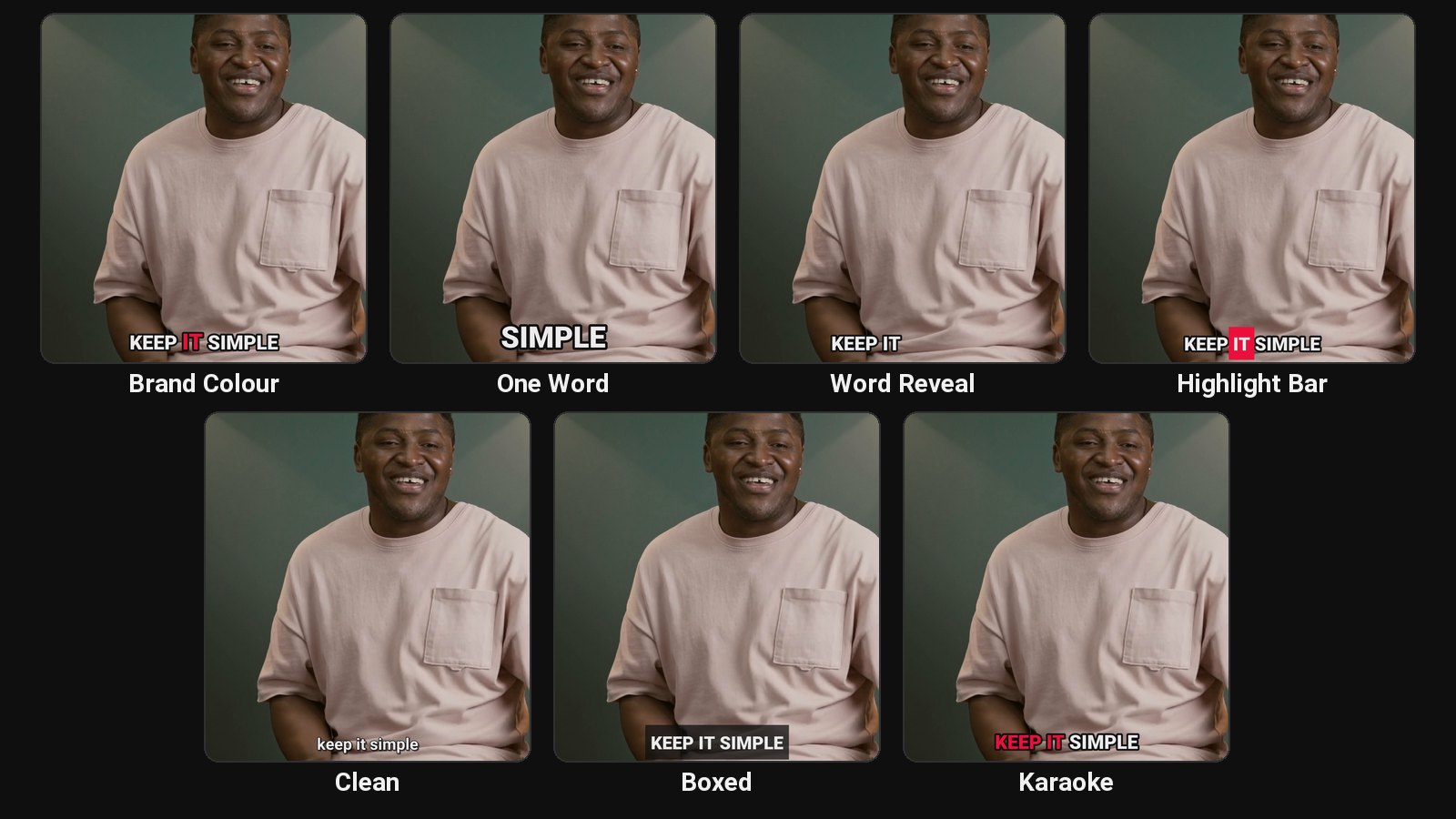
- Bold captions built for talking clips: seven styles including Brand Colour, One Word, Word Reveal and Highlight Bar, three in your brand colour.
- Scheduling on every plan to YouTube, Instagram, TikTok and Facebook, with titles and hashtags written per platform.
- 9 languages, detected automatically, Hindi included in Devanagari, plus caption translation.
- Works in any browser, on a laptop or a phone, with a Share button for posting by hand.
Pricing: Free trial (first 10 minutes of video). Starter $19/month ($16 yearly) for 4 hours of video. Pro $39/month ($32 yearly) for 20 hours and 3 brands. See plans.
2. Opus Clip
A clip tool billed per minute: 150 minutes on Starter ($15), 300 on Pro ($29), where the scheduler sits. See Opus Clip review.
3. Submagic
Animated captions with emojis and zooms on short videos, with plans capped at 2 to 30 minutes per video. See Submagic alternatives.
4. CapCut
A free editor with auto captions and a basic long video to shorts tool. See CapCut alternatives.
5. Vizard
600 minutes a month on Creator for $29 ($14.50 yearly). See Vizard pricing.
How to choose
| If you... | Pick |
|---|---|
| Want clips from long podcasts or talks | ClipFlame |
| Want a predictable price instead of credits | ClipFlame: hours of video, re-renders free |
| Want bold word-by-word captions in your brand colour | ClipFlame |
| Want clips posted for you | ClipFlame, scheduler on every plan |
Common questions
What is the best alternative to the Captions app?
For clipping long videos, ClipFlame. It's priced by hours of video instead of credits, scores every clip and schedules them to four platforms.
Is there a free alternative to Captions?
CapCut's core editor and captions are free. ClipFlame's free trial clips your first 10 minutes of video.
Can I get Captions-style bold captions in ClipFlame?
Yes. The Brand Colour, One Word, Word Reveal and Highlight Bar styles give the bold, word-by-word look. See Hormozi-style captions.