Best Submagic alternatives
On this page
The best Submagic alternative is ClipFlame, especially if you record podcasts, interviews or talks. It finds up to 20 clips inside a long video, scores each one for virality, captions them word by word and schedules them to four platforms, from $19 a month with no add-on. Other options: CapCut (free captions), Opus Clip, Descript and Klap.
Submagic is built for making short talking videos look good. People look for alternatives when they hit its limits: base plans cap video length at 2 minutes on Starter, 5 on Pro and 30 on Business, and clipping a long video into Shorts needs the separate Magic Clips add-on.
Disclosure: we make ClipFlame. Prices were checked on each tool's pricing page in October 2026 and are monthly-billing prices unless noted.
Quick comparison
| Tool | Paid from | Finds clips in long videos | Virality score | Scheduling | Free option |
|---|---|---|---|---|---|
| ClipFlame | $19/mo ($16 yearly) | Yes, up to 20 per video | Yes, every clip | Every plan | First 10 minutes of video free |
| Submagic | $19/mo ($12 yearly) | Magic Clips add-on, $19/mo | Not listed | Not listed | Free trial |
| CapCut | Free (Pro $19.99/mo) | Basic long-to-short tool | No | Not listed | Yes |
| Opus Clip | $15/mo | Yes | Yes | Pro, $29/mo | Free plan, watermarked |
| Descript | $24/mo ($16 yearly) | Yes, full clip creation on Creator ($35) | No | Not listed | 1 hour/mo, 720p, watermarked |
| Klap | $14/mo billed yearly | Yes, 100 clips a month | Yes | Yes | Not listed |
What clipping a weekly podcast costs
Take a one-hour podcast, four episodes a month, with clips from each:
| Tool | What you need | Monthly cost |
|---|---|---|
| ClipFlame | Starter: 4 hours of video, scheduling included | $19 ($16 yearly) |
| Opus Clip | Pro (300 minutes) | $29 |
| Descript | Creator, for full clip creation | $35 ($24 yearly) |
| Submagic | Starter plus Magic Clips add-on | about $38 |
If long videos are most of what you make, paying for a caption tool plus a clipping add-on is the expensive route.
1. ClipFlame
ClipFlame is built for the job Submagic treats as an add-on: finding the clips inside a long recording. It reads the transcript, picks every moment that stands on its own, cuts up to 20 clips on full sentences, frames the speaker for vertical and burns in word-by-word captions.
Why people switch from Submagic:
- Full episodes, not just short videos. Upload whole podcasts and webinars; Pro takes long streams in one upload.
- No add-on for clipping. Finding the clips is the core feature, on every plan.
- Every clip scored 0-100, sorted best first, with clips scoring 80 or more highlighted.
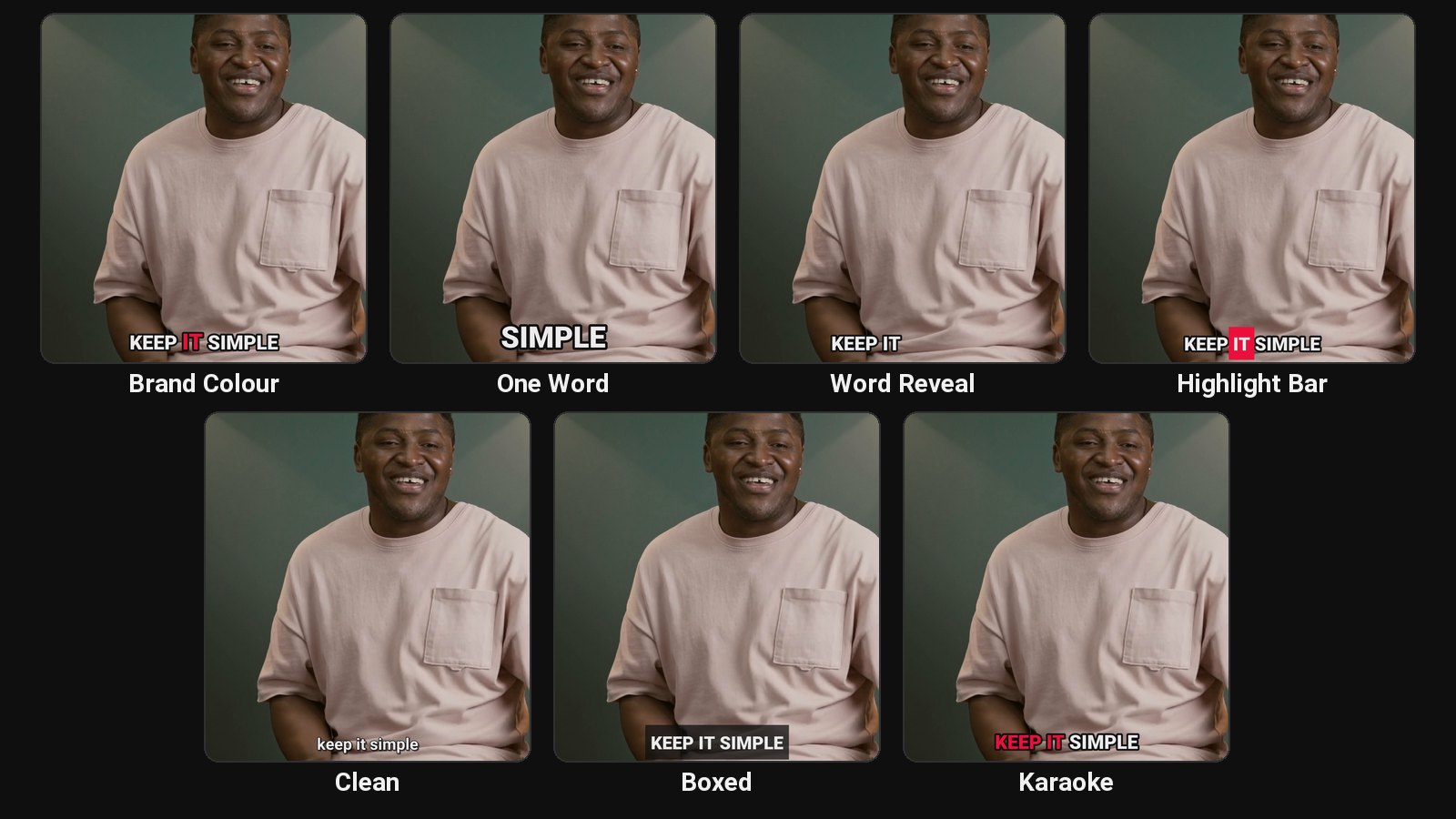
- Seven caption styles built for talking clips: Brand Colour, One Word, Word Reveal, Highlight Bar, Clean, Boxed and Karaoke, three in your brand colour. Switch per clip and re-render for free.
- Scheduling on every plan to YouTube, Instagram, TikTok and Facebook, with titles and hashtags written per platform.
- 9 languages, detected automatically, Hindi included in Devanagari, plus caption translation.
- A free trial with every feature: your first 10 minutes of video.
Pricing: Free trial (first 10 minutes of video). Starter $19/month ($16 yearly) for 4 hours of video. Pro $39/month ($32 yearly) for 20 hours and 3 brands. See plans.
Full comparison: ClipFlame vs Submagic.
2. CapCut
CapCut's auto captions are free, with plenty of animated styles. Its long video to shorts tool is basic, so you'll choose and trim most clips yourself. For the bold, highlighted look, see our guide to Hormozi-style captions.
Best for: one or two short videos a week that you edit yourself.
3. Opus Clip
Opus Clip finds clips in long videos and scores them. Starter is $15 a month for 150 minutes, Pro $29 for 300 minutes with a scheduler. Per-minute billing adds up on long shows.
Read more: Opus Clip review and Opus Clip alternatives.
4. Descript
Descript lets you edit video by editing text, and its AI assistant can pull clips, with full clip creation on Creator at $35 a month.
Best for: editing the full episode yourself. See ClipFlame vs Descript.
5. Klap
Klap charges by clips generated: 100 a month on Basic ($14 billed yearly), 300 on Pro.
Best for: many uploads with a few clips each. See ClipFlame vs Klap.
Is there a free Submagic alternative?
| Free option | What you get | The catch |
|---|---|---|
| ClipFlame free trial | Your first 10 minutes of video, scored and captioned clips, 10 scheduled posts | 10 minutes, then a paid plan |
| CapCut | Free auto captions | You find and cut every clip yourself |
| Opus Clip free plan | Monthly free minutes | Watermarked |
How to choose
| If you... | Pick |
|---|---|
| Record long podcasts, interviews or webinars | ClipFlame |
| Want clips without paying for an add-on | ClipFlame: clipping on every plan |
| Want the clips scheduled for you | ClipFlame: scheduler on every plan |
| Want bold, word-highlighted captions on long-video clips | ClipFlame: Brand Colour, Highlight Bar and One Word styles |
Common questions
What is the best Submagic alternative?
ClipFlame, if you start from long videos. It finds and scores up to 20 clips per video, captions them and schedules them, from $19 a month with no add-on.
Is there a free alternative to Submagic?
CapCut is free for captions. ClipFlame's free trial clips your first 10 minutes of video.
Can I get Submagic-style captions in ClipFlame?
Yes for the bold talking-clip look: One Word, Word Reveal, Highlight Bar and Brand Colour give big word-by-word captions with the spoken word highlighted, in your brand colour if you like.