How to make podcast clips
On this page
- What makes a podcast clip work
- Step 1: Record with clipping in mind
- Step 2: Find the moments in the transcript
- Step 3: Frame two or three people
- Step 4: Caption every word
- Step 5: Write a caption and title for each clip
- Step 6: Post a clip a day
- Doing it by hand vs using an AI clip tool
- Common questions
To make podcast clips, record your episode on video, pull 5 to 10 moments that work without context, cut each to 20–60 seconds on full sentences, reframe to vertical with the current speaker in frame, and burn in word-by-word captions. Post one clip a day and point each one back to the full episode.
If your show is audio-only, you can still make clips (an audiogram with a waveform and captions), but they get far less reach than video. The rest of this guide assumes you're recording video, even if it's just a webcam.
What makes a podcast clip work
Podcast clips have one job: make a stranger curious enough about you or your guest to find the full episode. A clip that summarises the episode doesn't do that. A clip that drops the viewer into the middle of a sharp moment does.
The clips that travel furthest usually fall into four buckets:
- The contrarian line. Your guest disagrees with the common advice, in one sentence. "Cold email isn't dead. Your cold email is."
- The number. A specific figure people didn't expect. Specific beats round: "we went from 212 to 4,000 listeners" beats "we grew a lot."
- The mini story. A 40-second story with a turn at the end. Setup, what went wrong, what they learned.
- The answer. A clean, direct answer to a question your audience would type into Google.
Notice what's missing: the intro, the sponsor read, the "great to have you on the show", and the recap at the end. None of those survive the cold-open test.
Step 1: Record with clipping in mind
A few habits at recording time save hours later:
- Record each person on their own camera if you can. Separate angles make vertical framing easy, because each speaker can fill the frame on their own.
- Leave headroom. If the camera is framed tight for 16:9, a 9:16 crop will cut off foreheads or chins. A slightly wider shot gives you room.
- Ask for the one-line answer. When a guest rambles, a follow-up like "if you had to put that in one sentence?" often produces your best clip.
- Good audio beats good video. People forgive a soft webcam. They swipe away from echo.
Step 2: Find the moments in the transcript
Skip the rewatch. Get a transcript and read it with a highlighter, looking for lines that would work as the first sentence of a clip. For a one-hour episode this takes 10 to 15 minutes and you'll usually find 10 to 15 candidates.
Then cut the list down. For each candidate, ask:
- Does it make sense with zero context?
- Is the first sentence a hook, or does the hook come a few seconds later? (Trim to the hook.)
- Does it end on a full sentence?
- Would the guest be happy to see it posted? (Don't clip the off-hand comment they'd regret.)
What goes wrong: clipping the funniest moment of the conversation. Humour that depends on 40 minutes of rapport rarely lands cold. Clip the sharpest idea instead.
Step 3: Frame two or three people
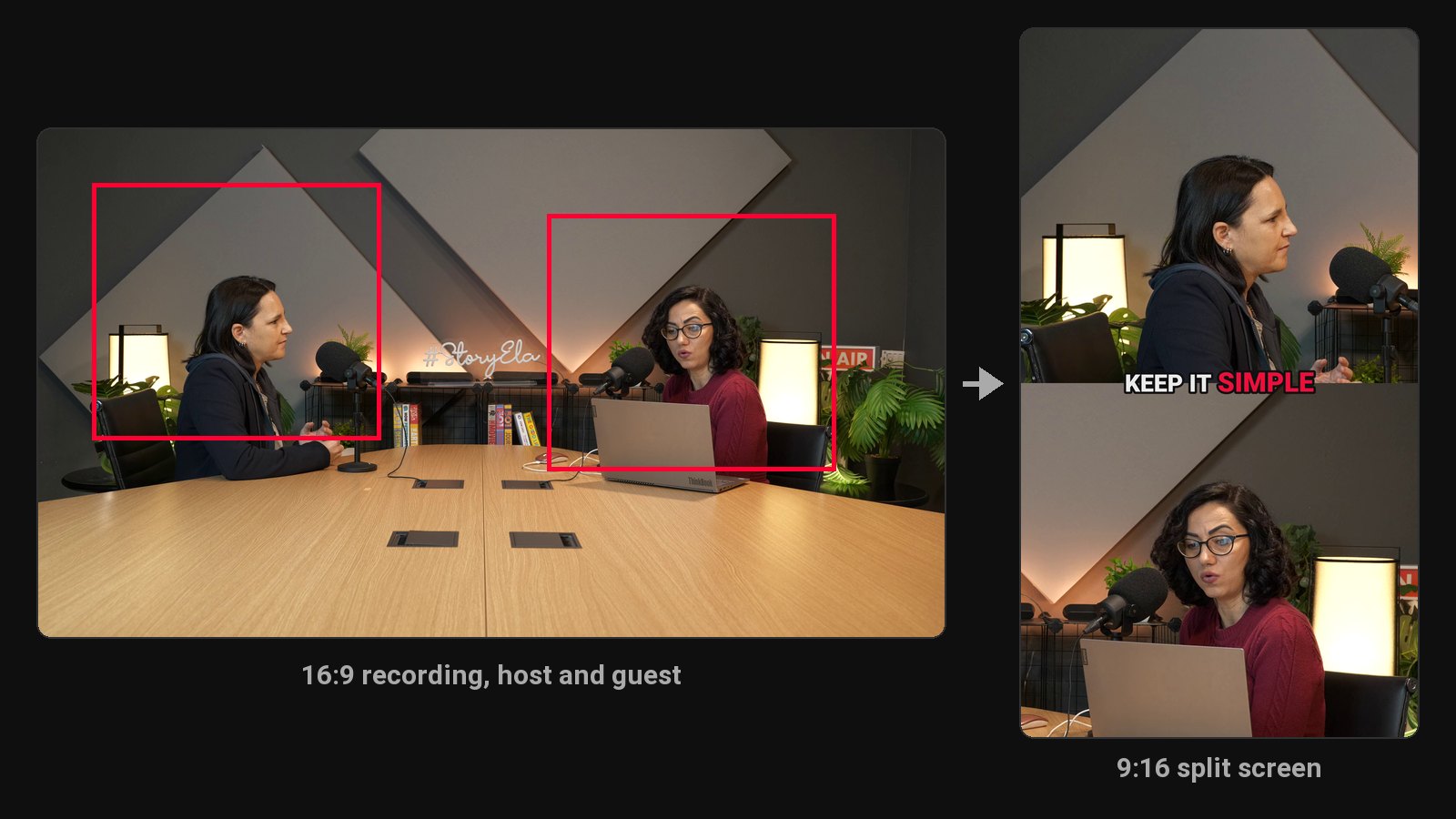
This is where podcast clips differ most from solo YouTube clips. You've got two people in a wide shot and a tall, narrow frame to fit them in.
Three approaches, in order of how often we see them work:
| Layout | When to use it | Watch out for |
|---|---|---|
| Active speaker | One person talks for most of the clip | Quick back-and-forth makes the crop jump |
| Split screen (stacked) | Debate, interview, fast exchange | Faces get small; captions need a clear spot |
| Wide with blurred fill | Three or more people, or one wide camera | Faces are tiny on a phone |
Active-speaker framing is the default in most AI clip tools. ClipFlame follows whoever is talking and keeps them centred even when they lean back or move, which is the part that takes longest to do by hand with keyframes.
Step 4: Caption every word
Podcasts are speech, so captions carry the whole clip for anyone watching muted. Use word-by-word captions, big and bold, placed in the middle of the frame rather than the bottom where app buttons cover them. We compare tools and styles in our guide on how to add captions to a video.
Two podcast-specific tips:
- Check the guest's name and company. Speech-to-text gets these wrong more than anything else.
- Keep your show's caption style consistent. Same font, same highlight colour, every clip. Regular viewers start recognising your clips before they see your face. ClipFlame's seven caption styles include three that use your brand colour for exactly this reason.
Step 5: Write a caption and title for each clip
The on-screen captions are the words. The post also needs a title (YouTube Shorts) or a caption (Reels, TikTok). Keep it short and don't repeat the first line of the clip. Add context the clip doesn't give: who the guest is, or what episode it's from.
Examples that work:
- "She quit a $300k job to start a podcast. Here's what she wishes she'd known."
- "Why our guest thinks your pricing page is lying to you"
End with a pointer to the full episode ("Full conversation on the channel" or a link in bio). That's the whole point of the clip.
Step 6: Post a clip a day
A one-hour episode gives you a week of clips. Post one a day, best clip first, rather than dumping them all on release day. You'll learn quickly which kinds of moments your audience responds to, and you can feed that back into how you interview.
When to post matters less than consistency, but there are a few things worth knowing. We cover them in the best time to post YouTube Shorts and how to get more views on Shorts.
Doing it by hand vs using an AI clip tool
By hand, a practised editor spends 15 to 30 minutes per finished clip. Eight clips a week is half a day of work, every week, and that's before writing post captions.
An AI podcast clip generator reads the transcript, picks moments, frames the speaker and captions them in a few minutes. You still review and fix, but you start from a draft instead of a blank timeline.
What to check before you pick one:
- Hours included. Most tools count minutes of uploaded video, so long podcasts use up small plans fast. A two-hour weekly show is 480 minutes a month, more than Opus Clip Pro's 300. ClipFlame Pro includes 20 hours (1,200 minutes) for $39.
- Speaker framing on two-person shots. Test it on your own footage, not the demo.
- Caption accuracy in your language, especially names.
- Posting. Some tools stop at the files. ClipFlame also schedules the clips to YouTube, Instagram, TikTok and Facebook, which matters if you're repurposing every episode, not just clipping one.
If you're weighing specific tools, our Opus Clip alternatives page compares the main options with real prices for a weekly podcast.
Clips are also the fastest way to grow the audience every podcast income stream depends on. See how to make money from a podcast, and how podcasters use ClipFlame or its podcast clip maker. Recording on Riverside? Compare Riverside Magic Clips alternatives.
Common questions
How long should podcast clips be?
20 to 60 seconds for most clips. Some strong stories run to 90 seconds. YouTube allows Shorts up to three minutes, but completion rate drops as clips get longer, so only go long when the story needs it.
Can I make clips from an audio-only podcast?
Yes, as audiograms: a still image or waveform with captions. They work for existing fans. For reach with new people, video clips do much better. If you're starting fresh, record the next episode on video even if it's just webcams.
Do I need my guest's permission to post clips?
Most guests expect clips and are happy to share them. It's still good practice to say so before recording, and to skip anything they'd rather not see posted out of context.
Should I post clips on TikTok, Reels and Shorts, or pick one?
Post the same 9:16 clip to all three. It costs almost nothing extra, and different clips break out on different platforms. For LinkedIn, a 4:5 version fills more of the feed.