ClipFlame for podcasters
On this page
Podcasters use ClipFlame to turn each video episode into everything it needs after recording: captioned vertical clips for Shorts, Reels and TikTok, scheduled to post through the week. Plans start at $19 a month for 4 hours of video, and Pro's 20 hours cover two or three one-hour episodes a week.
Most podcasts don't have a content problem. Every episode has five or ten moments that would stop someone scrolling. They have a time problem: finding those moments, cutting them, captioning them, writing a post for each, and then posting them on four platforms. That's most of a working day per episode, and it's usually the first thing to slip.
Where the time goes
| Job after recording | By hand | With ClipFlame |
|---|---|---|
| Find the best moments | Rewatch the episode, note timestamps | AI reads the transcript and picks them |
| Cut and reframe to vertical | Edit each clip, crop to 9:16 | Cut on full sentences, framed on the people in shot |
| Captions | Auto-caption, then fix and style | Word-by-word captions in 7 styles, fix any word in the editor |
| Posting | Log in to each app, one clip at a time | Scheduled to four platforms (every plan) |
What a podcaster's week looks like
Monday: record and edit the episode as usual.
Tuesday: upload the final edit to ClipFlame. While it works, do something else.
Tuesday afternoon: review. Skim the clips, drop the ones you don't love, nudge any edges, and fix your guest's name if the transcript got it wrong. Re-renders are free.
Wednesday: publish the full episode on YouTube.
Wednesday to Sunday: one or two clips a day. Put them on the calendar once and the scheduler posts them to YouTube, Instagram, TikTok and Facebook. Rather post by hand? Download the clips.
For what to post first and how to write hooks, see how to make podcast clips that get watched.
Built for long, two-person conversations
- Room for long episodes. Each episode uses as many minutes as it is long. Starter's 4 hours a month cover a weekly 45-minute show; Pro's 20 hours cover two or three one-hour episodes a week.
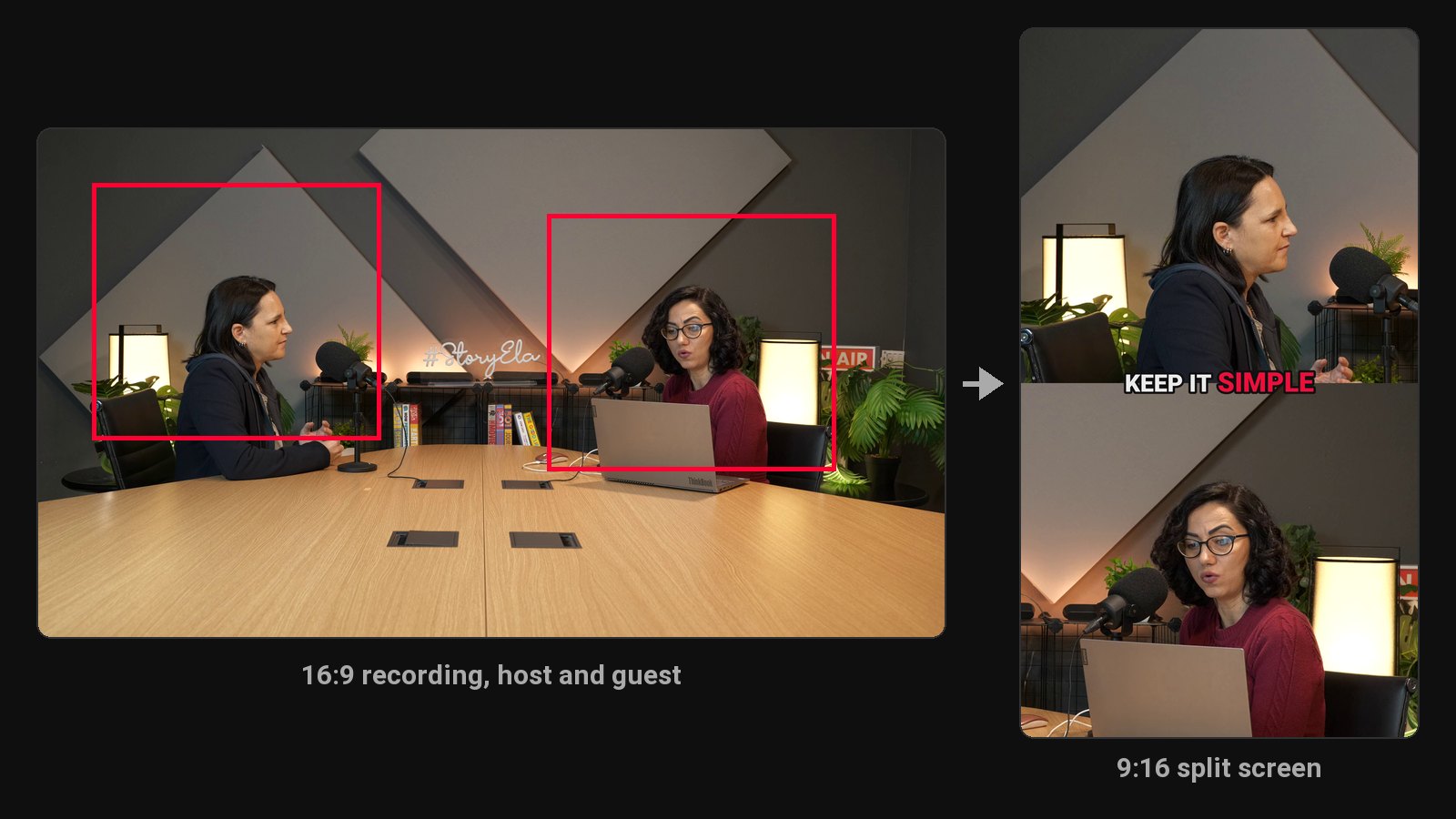
- Framing for host and guest. The crop follows the camera's cuts and centres on whoever is in shot. In a wide two-shot where you sit too far apart for one vertical frame, the clip switches to a split screen, one person above the other.
- Clips that stand alone. The picker skips anything that depends on earlier context and looks for a strong first line.
- 9 languages, detected automatically, including Hindi. Useful for bilingual shows too: each episode's captions follow its spoken language.
Your brand on every clip
On every paid plan, the brand kit adds your watermark and end card to every clip, and three of the seven caption styles use your brand colour. After a few weeks, people start recognising your clips before they see the name.
What it costs
| Show | Plan | Price |
|---|---|---|
| Weekly, up to 45 minutes, with your watermark and end card | Starter | $19/month (4 hours of video) |
| Weekly hour-long episodes, or two or three a week | Pro | $39/month (20 hours of video) |
Your first 10 minutes of video are free, with every Pro feature.
What you need
A video recording of the episode works best. If you record remotely, export the combined or speaker-view video from your recording tool and upload that (or a Google Drive or Dropbox link). Audio-only shows can upload the MP3, M4A or WAV instead: each clip uses your episode artwork with a waveform and captions.
Turning the show into income? See how to make money from a podcast.
Common questions
Does ClipFlame tell me which clips are best?
Yes. Every clip gets a virality score from 0 to 100, clips come sorted best first, and clips scoring 80 or more are highlighted. Each video gives up to 20 clips, so you can post the strongest first.
Is ClipFlame a podcast editor?
No. Edit the episode in your usual tool, then upload the finished file. ClipFlame handles the clips after the edit: finding, cutting, captioning and posting them. If you're weighing it against an editor, see ClipFlame vs Descript.
How many clips will I get per episode?
It depends on the conversation. The price doesn't change with the number of clips.
Can I use it for my guests' promotion too?
Yes. Download the clips your guest appears in and send them over. Guests who share clips bring their own audience to your show.