ClipFlame for events
On this page
Event marketers use ClipFlame to turn recorded keynotes, talks and panels into captioned highlight clips for Instagram, YouTube Shorts and TikTok, scheduled to go out after the event. It helps promote the next event with the best moments of the last one.
An event produces hours of expert content in a day or two, and most of it sits unwatched in a session library. Meanwhile, the marketing team needs social proof for next year's tickets. The clips that sell an event are 45 seconds of a speaker saying something sharp, and every session has a few.
What to do with each session recording
| Output | Use |
|---|---|
| Highlight clips (9:16, 4:5, 1:1) | Social posts during and after the event, speaker promotion |
| Scheduled posts (every plan) | A steady stream of session clips on YouTube, Instagram, TikTok and Facebook |
| Brand kit | Your event logo and an end card with next year's dates on every clip |
Panels and multi-speaker sessions
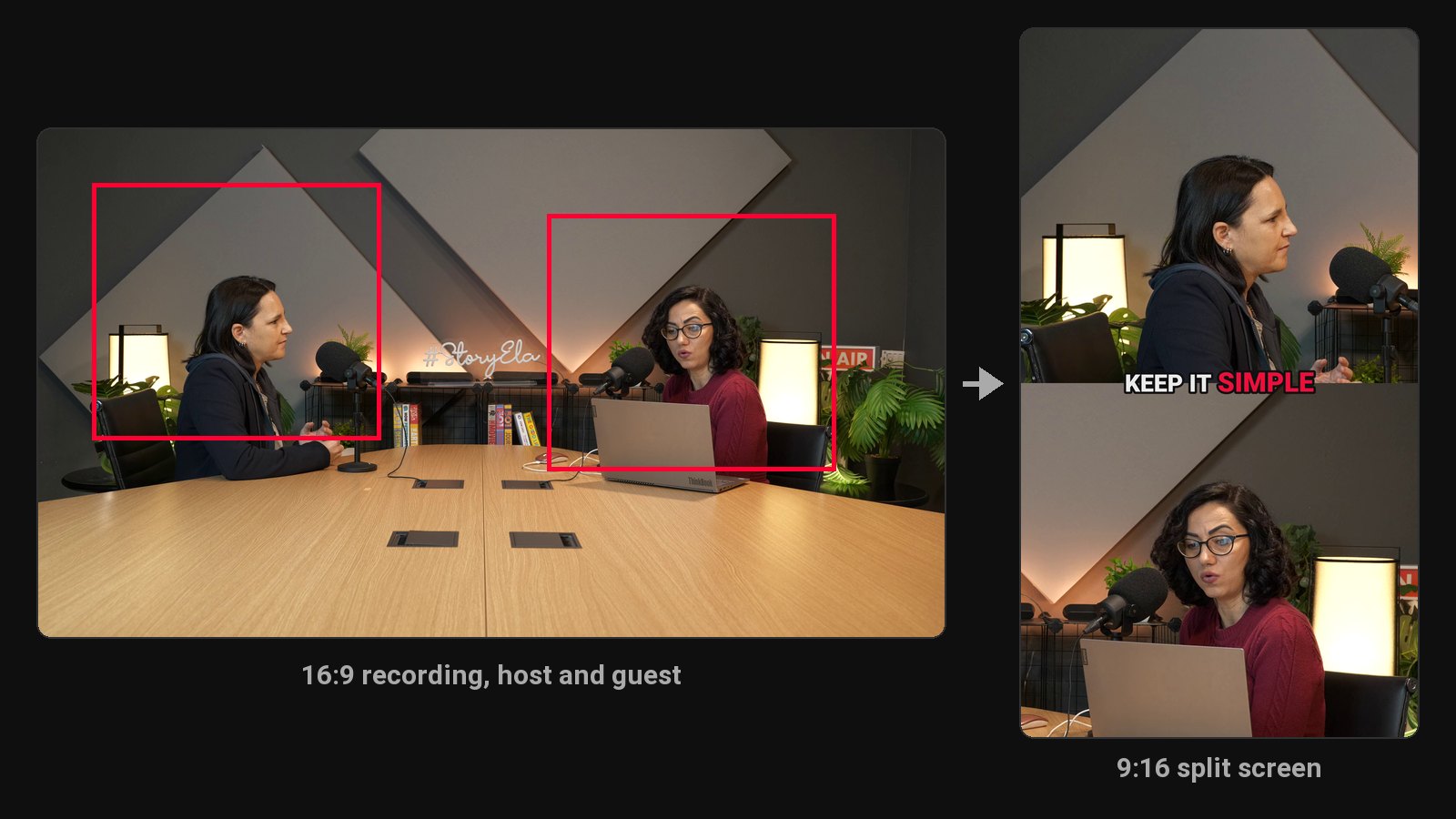
The crop follows the camera's cuts and centres on whoever is in each shot. When two panellists share a wide shot and sit too far apart for one vertical frame, the clip uses a split screen. Wide shots of larger panels are shown whole over a blurred background. For best results, upload the switched program feed rather than a single static wide camera.
Give speakers their clips
Speakers share clips of themselves far more than they share a session library link. Send each speaker their best two or three clips after the event; their audiences become your next event's audience.
Publishers clipping interviews and panels every day: see ClipFlame for media publishers.
Workflow
- Get each session as a separate file from your AV team (or via Google Drive or Dropbox).
- Upload sessions to ClipFlame.
- Review clips with speakers where needed.
- Post through the week after the event, and save the best for early-bird promotion.
Marketing team running the event? See ClipFlame for marketers. For how highlights are picked, see the highlight video maker.
Pricing
Each session uses as many minutes as it is long: Starter $19/month for 4 hours of video, Pro $39/month for 20 hours. Twenty 45-minute sessions (15 hours) fit in one month of Pro. Both include the brand kit. For bigger events, spread uploads over a couple of months. Your first 10 minutes of video are free.
Common questions
Does ClipFlame tell me which clips are best?
Yes. Every clip gets a virality score from 0 to 100, clips come sorted best first, and clips scoring 80 or more are highlighted. Each video gives up to 20 clips, so you can post the strongest first.
Can ClipFlame handle a full-day livestream recording?
Yes, on Pro. Split the day into its sessions and upload each one: separate sessions give cleaner clips, and each uses only its own length from your hours.
Does it work in multiple languages?
Yes. Each session is captioned in its spoken language, across 9 languages.