Best podcast clip makers in 2026
On this page
- Our top picks at a glance
- How we compared them
- What a weekly podcast costs on each
- 1. ClipFlame
- 2. Opus Clip
- 3. Riverside Magic Clips
- 4. Descript
- 5. Vizard: best for high monthly volume
- 6. Klap
- 7. Headliner: best for waveform audiograms
- Video podcast or audio-only?
- What makes a good podcast clip
- How to choose
- Common questions
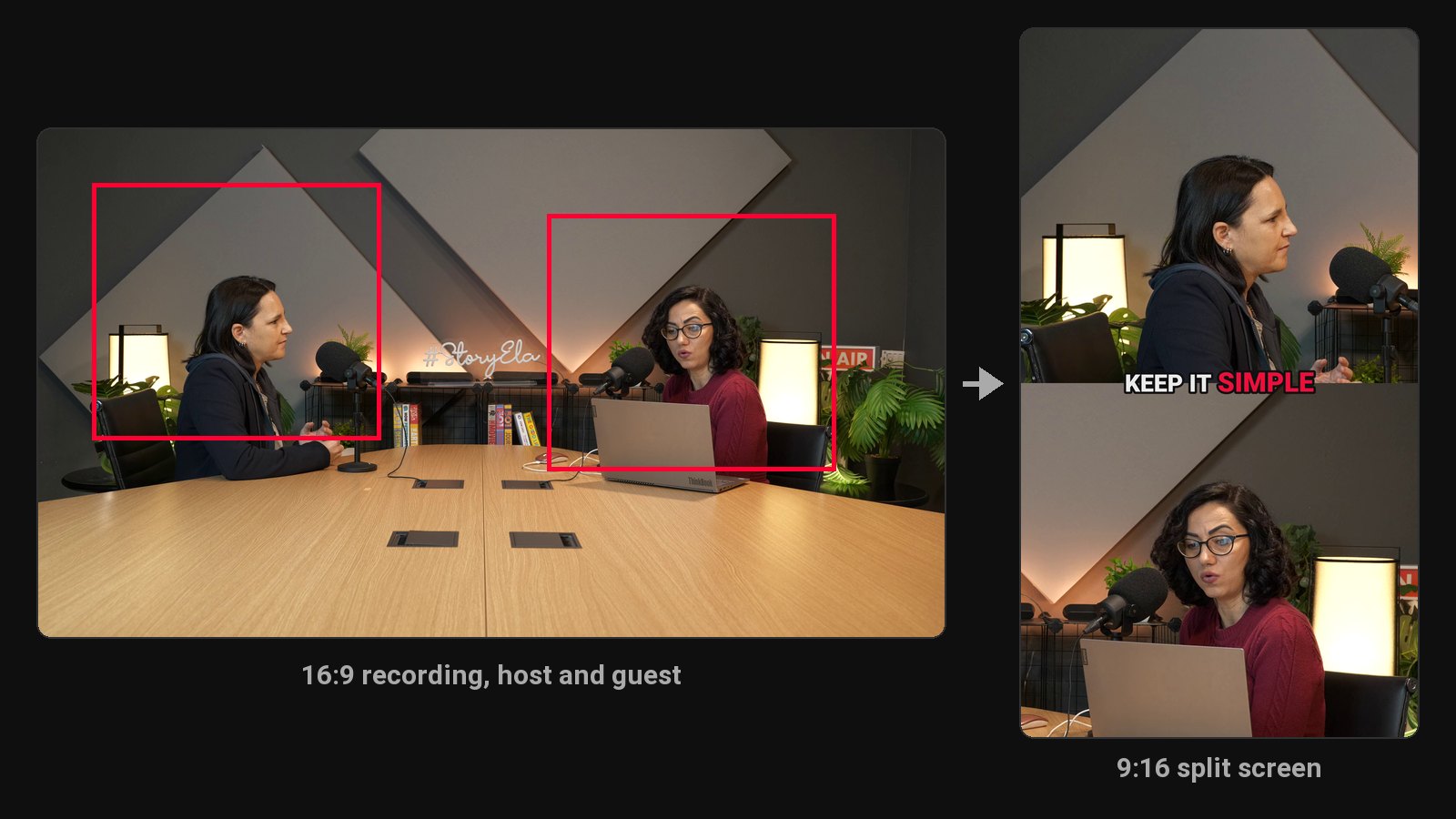
The best podcast clip maker in 2026 is ClipFlame. It finds up to 20 clips in each episode, scores each one for virality, frames whoever is talking (split screen when host and guest sit apart), turns audio-only episodes into captioned clips over your cover art, and schedules them to four platforms. Starter gives 4 hours of video a month for $19, and Pro gives 20 hours for $39. Also compared: Opus Clip, Riverside Magic Clips, Descript, Vizard, Klap and Headliner.
Podcasts are the hardest test for a clip tool. Episodes run an hour or two, so the hours a plan includes matter more than its price. There are two or three people in the frame, so a simple center crop cuts someone off. Some shows have no video at all. And the best moment in a conversation often depends on forty minutes of rapport that a clip can't carry. This roundup judges every tool on those problems.
Disclosure: we make ClipFlame. Prices come from each tool's pricing page, checked in October 2026, monthly billing unless noted.
Our top picks at a glance
| Rank | Tool | Best for | Two-speaker framing | Audio-only episodes | Virality score | Scheduling | Weekly 2-hour show |
|---|---|---|---|---|---|---|---|
| 1 | ClipFlame | Video and audio podcasts | Follows the speaker, split screen when needed | Yes, captions over cover art | Yes, every clip | Every plan | $39/mo (Pro, 20 h) |
| 2 | Opus Clip | Short and medium episodes | Yes | Video only | Yes | Pro | $29/mo + extra minutes |
| 3 | Riverside Magic Clips | Shows already recorded on Riverside | Yes | Yes | Not listed | Grow, $39/mo | Included with recording plan |
| 4 | Descript | Editing the full episode by transcript | Yes, in the editor | Yes | No | Not listed | $35/mo (Creator) |
| 5 | Vizard | High monthly volume | Yes | Video only | Yes | Yes | $29/mo |
| 6 | Klap | Many shows, few clips each | Yes | Video only | Yes | Yes | $14/mo billed yearly, 100 clips |
| 7 | Headliner | Audiograms for audio shows | Not applicable | Yes, waveform audiograms | No | Not listed | Paid plans per video |
How we compared them
We compared every tool against the same job: clipping a weekly, two-hour, two-person interview podcast, using each tool's published plans and features. Five things decide it, in order:
- Price for long episodes. How many hours of video a plan covers, or how many clips.
- Two-person framing. Does the vertical crop follow the speaker, and handle host and guest sitting far apart?
- Clips that stand alone. Each clip should start and end on a full sentence and make sense without the episode.
- Ranking and posting. Does it tell you which clips to post first, and post them for you?
- Audio-only shows. Can it make a postable clip when there's no video?
What a weekly podcast costs on each
| Weekly episode | ClipFlame | Opus Clip | Vizard | Descript | Klap |
|---|---|---|---|---|---|
| 60 minutes (240 min a month) | $19 | $29 (Pro) | $29 (Creator) | $35 (Creator) | $14, billed yearly |
| 90 minutes (360 min) | $39 (Pro) | $29 + extra minutes | $29 (Creator) | $35 (Creator) | $14, billed yearly |
| 2 hours (480 min) | $39 (Pro) | $29 + extra minutes | $29 (Creator) | $35 (Creator) | $14 yearly, 80 of 100 clips |
| Scheduling at that price | Yes | Yes | Yes | Not listed | Yes |
ClipFlame counts the length of each episode and includes more hours than most. Starter gives 4 hours a month for $19, where Opus Clip Starter gives 2.5 hours for $15. Pro gives 20 hours for $39, against 5 hours on Opus Clip Pro and 10 hours on Vizard. A weekly one-hour show is 4 to 5 hours a month, so Starter covers four episodes; a weekly two-hour show is 8 to 10 hours, well inside Pro.
1. ClipFlame
ClipFlame reads the full transcript and returns up to 20 clips per episode, each a complete thought between 15 and 90 seconds. It frames whoever is speaking and switches to a split screen when host and guest sit too far apart for one vertical frame. Audio-only episodes become captioned vertical clips over your cover art.
What stands out:
- A virality score on every clip. Clips are rated 0 to 100 on their opening line, completeness and payoff, sorted best first, with clips scoring 80 or more highlighted.
- 20 hours a month on Pro. Room for a weekly two-hour show with hours to spare, and long streams in one upload.
- Posting built in on every plan. The scheduler posts to YouTube, Instagram, TikTok and Facebook, with a title, caption and hashtags written per platform from what was said.
- Captions in your style. Seven word-by-word styles, three in your brand colour, plus a brand kit with your show's watermark and end card.
- 9 languages, including Hindi in Devanagari, with caption translation.
- Free edits. Nudge a clip's start or end, fix a guest's name, change the style, and re-render up to 30 times per episode.
Pricing: Free trial (10 minutes of video, 10 scheduled posts). Starter $19/month ($16 yearly) for 4 hours a month. Pro $39/month ($32 yearly) for 20 hours, with 3 brands for networks running several shows.
Best for: weekly interview and solo shows that want a clip a day from each episode. See ClipFlame for podcasters.
2. Opus Clip
Opus Clip finds clips, scores them and adds captions. It's billed per minute: Starter $15 for 150 minutes, Pro $29 for 300, where the scheduler sits.
Watch out for: a weekly hour-long show needs Pro, and longer shows need extra minutes. See ClipFlame vs Opus Clip.
3. Riverside Magic Clips
Riverside records each guest locally, then pulls clips from the recording with Magic Clips. It comes with Riverside's recording plans: Pro $29 a month ($24 yearly), with social scheduling on Grow at $39.
Watch out for: you pay for recording hours whether you need them or not. See Riverside Magic Clips alternatives.
4. Descript
Descript lets you edit the episode by editing its transcript, and its AI can pull clips, with full clip creation on Creator at $35 a month ($24 yearly).
Watch out for: you finish each clip in the editor yourself. See ClipFlame vs Descript.
5. Vizard: best for high monthly volume
Vizard's Creator plan includes 600 minutes a month for $29 ($14.50 yearly). The free plan is 720p and watermarked, and the brand kit is on Business. See ClipFlame vs Vizard.
6. Klap
Klap charges per clip: 100 a month on Basic ($14 billed yearly). Generated clips you don't use still count. See ClipFlame vs Klap.
7. Headliner: best for waveform audiograms
Headliner turns audio into audiograms: a static image, a moving waveform and captions. It's a classic for audio-only shows that just want a teaser.
Watch out for: you pick the moments yourself, and a waveform holds attention less than a captioned clip of real speech over your cover art.
Video podcast or audio-only?
| Your show | What works best | Tool |
|---|---|---|
| Video, one host | Speaker framing, bold captions | ClipFlame |
| Video, host and guest | Speaker tracking with split screen | ClipFlame |
| Remote interview recorded on Riverside | Riverside Magic Clips, or upload the export to ClipFlame | ClipFlame for scored, scheduled clips |
| Audio only | Captioned clips over cover art | ClipFlame, or Headliner for waveform audiograms |
What makes a good podcast clip
The tool picks candidates; a good clip still has three things. It opens on a line that works cold, like a claim, a number or a question. It finishes the thought. And it doesn't need the forty minutes before it. Funny moments that depend on rapport rarely land with strangers; sharp ideas do. That's why ClipFlame scores clips on their opening, completeness and payoff. Our podcast clips guide covers the editorial side in detail.
How to choose
| If you... | Pick |
|---|---|
| Publish a weekly video podcast of an hour or more | ClipFlame |
| Have an audio-only show | ClipFlame: captioned clips over your cover art |
| Want clips ranked best first | ClipFlame |
| Want clips posted to four platforms on the entry plan | ClipFlame |
| Run a podcast network or several shows | ClipFlame Pro: 3 brands |
Common questions
What is the best podcast clip maker?
ClipFlame. It finds up to 20 clips per episode, scores each for virality, handles two-speaker framing and audio-only shows, and schedules the clips to four platforms, from $19 a month for 4 hours of video.
How many clips should I make from one podcast episode?
Five to ten good ones covers a week of daily posts. ClipFlame returns up to 20, sorted by score, so you can pick the strongest.
How long should a podcast clip be?
20 to 60 seconds for most clips; strong stories can run to 90. See how long YouTube Shorts can be.
Can I make clips from an audio-only podcast?
Yes. ClipFlame turns audio-only episodes into vertical clips with word-by-word captions over your cover art.
Do podcast clips help grow the show?
They bring new listeners from Shorts, Reels and TikTok to the full episode. Point each clip back to the episode, and post consistently. See how to make money from a podcast.