Best video schedulers in 2026
On this page
- Our top picks at a glance
- How we compared them
- What daily video posting costs on each
- 1. ClipFlame
- 2. Buffer
- 3. Later: best for Instagram-first creators
- 4. Metricool
- 5. Publer: best for bulk uploads
- 6. quso.ai: clips plus scheduling, on credits
- 7. Hootsuite: built for large teams
- 8. Meta Business Suite
- What each platform's own scheduler can do
- How to choose
- Common questions
The best social media scheduler for video is ClipFlame if your videos start as podcasts, interviews or YouTube videos: it cuts up to 20 scored, captioned clips from each long video and posts them to YouTube, Instagram, TikTok and Facebook, with 150 posts a month for $19. If you already have finished clips, Buffer and Later are the cheapest general schedulers. Also compared: Metricool, Publer, Hootsuite, quso.ai and Meta Business Suite.
Most scheduler roundups compare calendars and analytics. For video creators the real questions are different. Where do the clips come from? Does the tool post Reels, Shorts and TikToks natively, or just send you a reminder? And what does it cost to post one clip a day to four platforms, which is about 120 posts a month?
Disclosure: we make ClipFlame. Prices come from each tool's pricing page, checked in October 2026, monthly billing unless noted.
Our top picks at a glance
| Rank | Tool | Best for | Makes the clips | Video platforms | Price to post daily to 4 platforms | Free option |
|---|---|---|---|---|---|---|
| 1 | ClipFlame | Creators with long videos | Yes, up to 20 scored clips per video | YouTube, Instagram, TikTok, Facebook | $19/mo (150 posts) | Free trial: 10 minutes of video, 10 posts |
| 2 | Buffer | Cheap scheduling of finished clips | No | Instagram, TikTok, YouTube Shorts, Facebook, LinkedIn | $20/mo ($5 per channel) | 3 channels, 10 posts each |
| 3 | Later | Instagram-first creators | No | Instagram, TikTok, YouTube, Facebook, LinkedIn | $25/mo (30 posts per profile) | Not listed |
| 4 | Metricool | Scheduling plus analytics | No | Instagram, TikTok, YouTube, Facebook, LinkedIn | From $20/mo | 1 brand, 20 posts/mo |
| 5 | Publer | Bulk uploads | No | Instagram, TikTok, YouTube, Facebook, LinkedIn | About $5 per account | Yes |
| 6 | quso.ai | Clips plus scheduling on credits | Yes | 7 platforms on Essential | $39/mo (Essential) | 75 credits/mo |
| 7 | Hootsuite | Large teams | No | Most major platforms | $99/user/mo, billed yearly | 14-day trial |
| 8 | Meta Business Suite | Facebook and Instagram only | No | Facebook, Instagram | Free | Free |
How we compared them
Every tool was measured against the same job: one short clip a day, posted natively to YouTube Shorts, Instagram Reels, TikTok and a Facebook Page. That's 4 channels and about 120 posts a month. We looked at five things, in order:
- Where the clips come from. Most schedulers assume you already have finished vertical videos. If you don't, cutting and captioning them is the bigger job.
- Native video posting. The tool should publish the video itself to each platform, not send a phone reminder to post it by hand.
- Price for the daily-clip schedule, including per-channel and per-post limits.
- Per-platform captions. Each platform needs its own text and hashtag rules, like Instagram's 5-hashtag limit.
- Free option that lets you try it on real posts.
What daily video posting costs on each
| Tool | Plan that covers 120 posts a month on 4 channels | Monthly | Yearly (per month) | Clips made for you |
|---|---|---|---|---|
| ClipFlame | Starter: 150 posts, plus 4 hours of video cut into clips | $19 | $16 | Yes |
| Buffer | Essentials, $5 per channel × 4 | $20 | $16 | No |
| Later | Starter: 30 posts per profile, 8 profiles | $25 | $18.75 | No |
| Metricool | Starter, unlimited publishing | From $20 | Lower on yearly | No |
| Publer | Professional, about $5 per account | About $20 | About $4 per account | No |
| quso.ai | Essential, scheduling to 7 platforms | $39 | $26 | Yes, on credits |
| Hootsuite | Standard | Not listed | $99 per user | No |
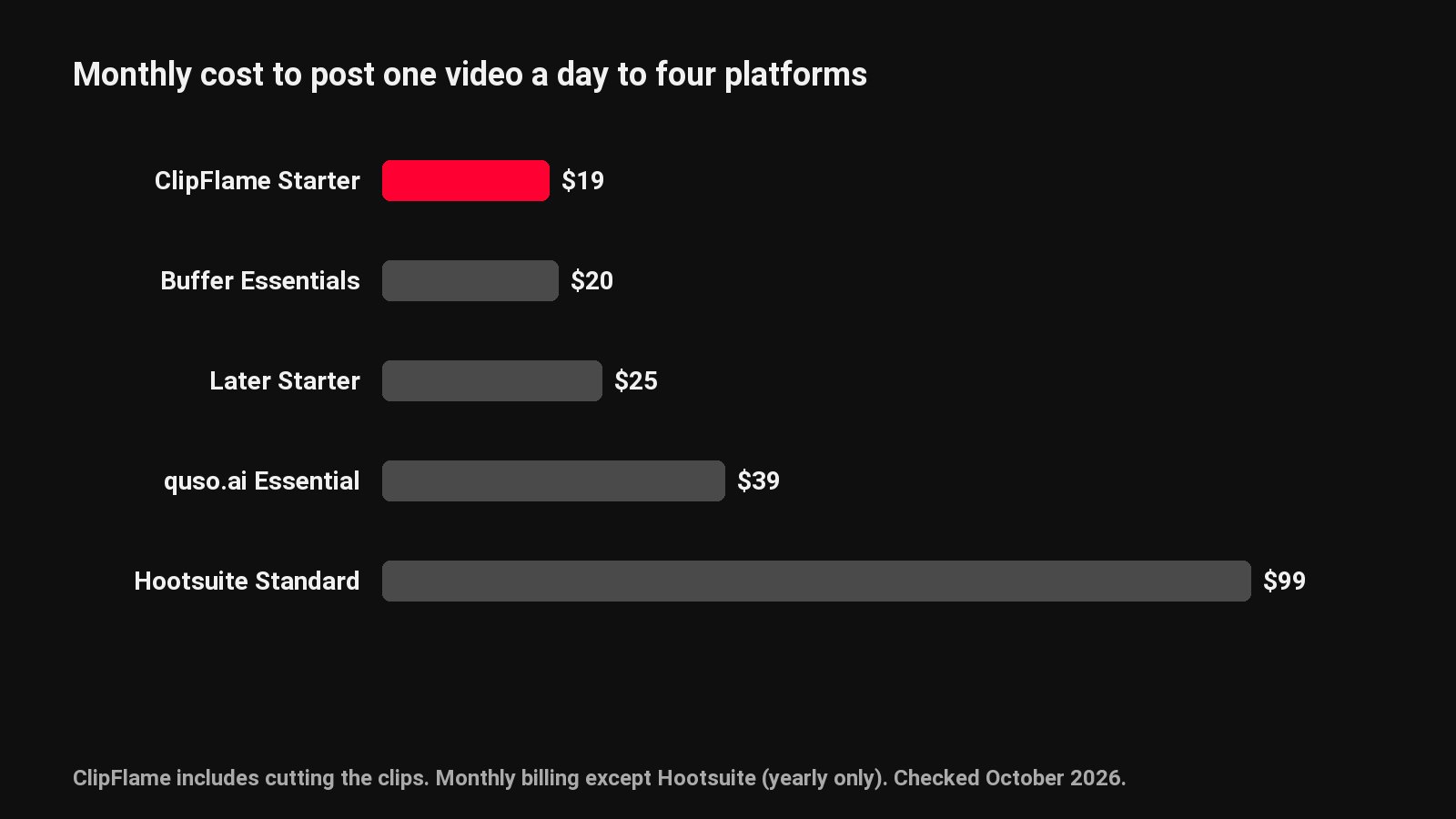
The general schedulers are close on price for this schedule. The difference is what's included: ClipFlame's $19 covers making the clips too, which is where most of the hours go.
1. ClipFlame
ClipFlame starts one step earlier than other schedulers. Upload a podcast, interview, webinar or YouTube video and it finds up to 20 moments that stand on their own, cuts them to 9:16, 4:5 or 1:1, frames the speaker and burns in word-by-word captions. Then you put each clip on the calendar.
What stands out:
- The clips come with it. Every clip is scored 0-100 for virality, sorted best first, with the top ones highlighted, so a week of posts is picked in minutes.
- Native posting to four platforms: YouTube (Shorts and full videos), Instagram Reels, TikTok through its official Content Posting API, and Facebook Pages.
- Captions per platform. Each clip gets a title, caption and hashtags written for each network from what was said, within each platform's rules.
- Upload your own videos too. Finished MP4s and MOVs go on the same calendar.
- Pro runs 3 brands under one login, each with its own accounts and brand kit.
Pricing: Free trial with 10 minutes of video and 10 scheduled posts. Starter $19/month ($16 yearly): 4 hours of video a month, 150 posts. Pro $39/month ($32 yearly): 20 hours, 750 posts, 3 brands.
Best for: podcasters, YouTubers, coaches and agencies who record long and want short clips going out every day. See the platform pages for YouTube, Instagram, TikTok and Facebook.
2. Buffer
Buffer bills per channel: Essentials is $5 a month per channel with unlimited scheduled posts, Team $10. The free plan covers 3 channels with 10 scheduled posts each. It publishes to Instagram, TikTok, YouTube Shorts, Facebook Pages and LinkedIn.
Watch out for: it schedules videos you've already made. Cutting, captioning and resizing happen somewhere else.
3. Later: best for Instagram-first creators
Later's Starter plan is $25 a month ($18.75 yearly) for one social set of up to 8 profiles, with 30 posts per profile a month, enough for one clip a day per platform. Growth ($50) raises that to 180 posts per profile.
Watch out for: the post cap on Starter, and no clip making.
4. Metricool
Metricool's free plan covers one brand with 20 posts a month and 30 days of analytics. Paid plans start from $20 a month with unlimited publishing and full analytics history.
Watch out for: 20 free posts runs out in five days on a four-platform daily schedule.
5. Publer: best for bulk uploads
Publer bills per social account: about $5 a month on Professional ($4 yearly) and $10 on Business. It's known for bulk scheduling of many videos at once.
Watch out for: per-account pricing grows with every channel you add.
6. quso.ai: clips plus scheduling, on credits
quso.ai (formerly vidyo.ai) also cuts clips from long videos and schedules them. Scheduling to seven platforms starts on Essential at $39 a month ($26 yearly), and clipping, captioning and editing all draw on the same monthly credits.
Watch out for: credits run down with edits as well as uploads. See ClipFlame vs quso.ai.
7. Hootsuite: built for large teams
Hootsuite's Standard plan is $99 per user a month on yearly billing, with 10 social accounts, and higher plans add approvals and analytics for big teams.
Watch out for: the price is built for marketing departments, not solo creators.
8. Meta Business Suite
Meta's own tool schedules Facebook and Instagram posts and Reels for free, linked to your Facebook Page. It doesn't post to YouTube, TikTok or LinkedIn.
What each platform's own scheduler can do
Every platform has a free built-in scheduler. They're fine for one platform, and slow for four:
| Platform | Native scheduler | How far ahead | Notes |
|---|---|---|---|
| YouTube | YouTube Studio | Pick any date | One video at a time |
| Instagram app, Meta Business Suite | Up to 75 days | Professional accounts only, 25 posts a day | |
| TikTok | TikTok Studio (web) | 15 minutes to 10 days | One video at a time |
| Meta Business Suite | Weeks ahead | Pages and professional mode only |
Four platforms and seven clips a week is 28 separate uploads by hand. A multi-platform scheduler turns it into seven. Step-by-step guides: YouTube Shorts, Instagram Reels, TikTok and Facebook.
How to choose
| If you... | Pick |
|---|---|
| Record podcasts, interviews or long YouTube videos | ClipFlame: clips made, scored and scheduled |
| Want clips and posting for under $20 a month | ClipFlame Starter |
| Run several shows or client brands | ClipFlame Pro: 3 brands, 750 posts |
| Already have finished clips and want the lowest per-channel price | Buffer |
| Only post to Facebook and Instagram | Meta Business Suite |
Common questions
What is the best social media scheduler for video?
ClipFlame, for creators whose videos start as long recordings: it makes up to 20 scored, captioned clips per video and schedules them to YouTube, Instagram, TikTok and Facebook for $19 a month. For finished clips only, Buffer is the cheapest per channel.
Can you schedule Reels, Shorts and TikToks at the same time?
Yes, with a multi-platform scheduler. Put one clip on the calendar, tick each platform, and it posts natively to each with its own caption. See how to post to Reels, Shorts and TikTok at the same time.
Is there a free social media scheduler for video?
Each platform's own scheduler is free. Buffer's free plan covers 3 channels with 10 posts each, Metricool's 20 posts a month, and ClipFlame's free trial includes 10 minutes of video cut into clips plus 10 scheduled posts.
Do scheduled posts get less reach?
No platform has said it ranks scheduled posts lower. A scheduled post is published at the time you set, like one posted by hand.
How many posts a month do I need?
One clip a day to four platforms is about 120 posts a month, which fits in ClipFlame Starter's 150. Pro includes 750.