Post to Reels, Shorts and TikTok at once
On this page
To post one video to Instagram Reels, YouTube Shorts and TikTok at the same time, export one clean 9:16 file (1080×1920, no watermark, captions in the middle of the frame), write a caption for each platform, and use a scheduler connected to all three accounts. Upload the file natively to each one: a shared link or a downloaded TikTok gets less reach.
Is cross-posting the same video OK?
Yes. Most short-form creators post the same clip to all three. The platforms don't penalise a video for existing elsewhere; what they show less is low-quality re-uploads: videos with another platform's watermark, blurry re-encodes, or borders from the wrong aspect ratio. Upload the original file everywhere and you avoid all three.
One file that works everywhere
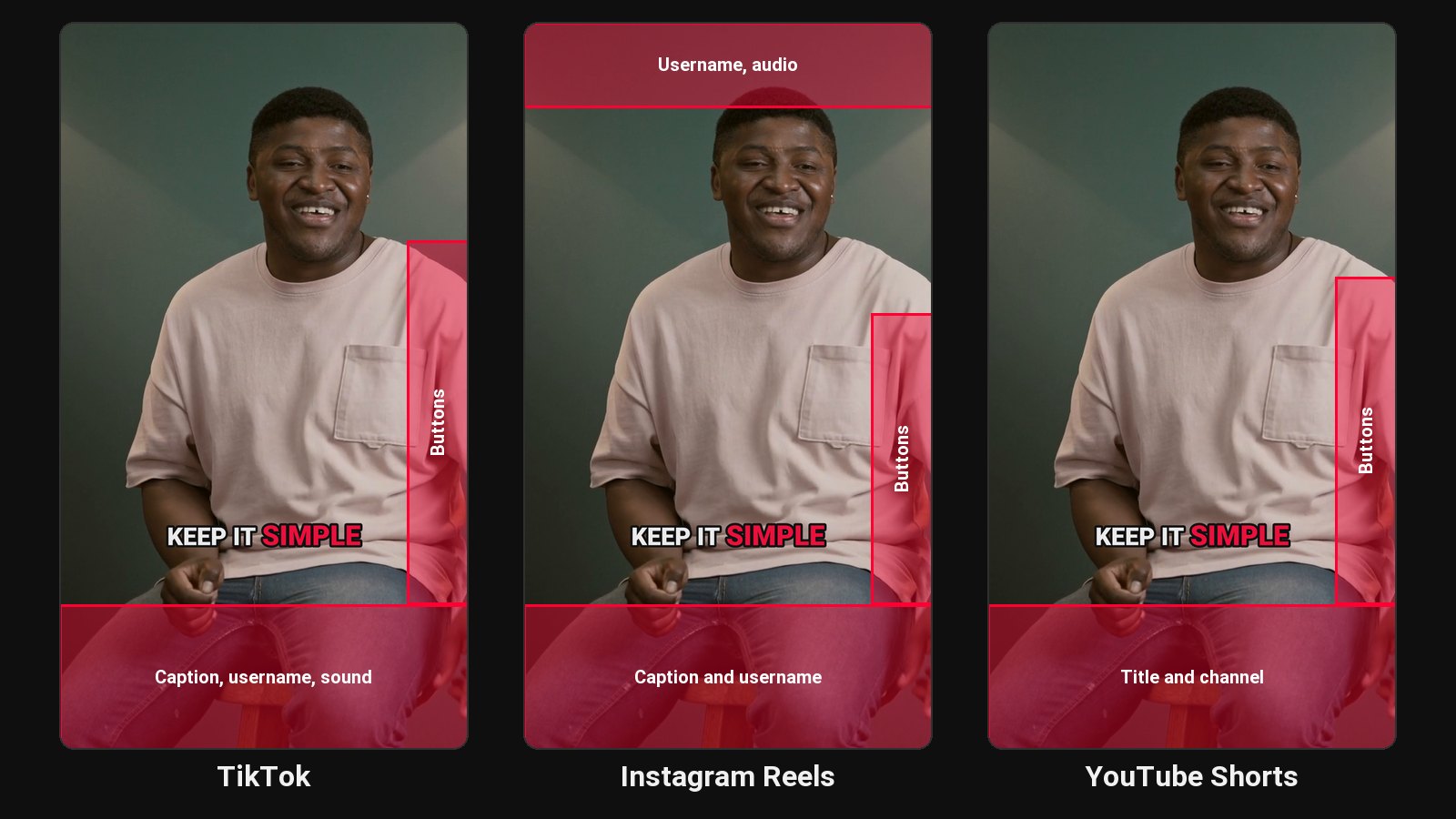
- Aspect: 9:16 vertical, 1080×1920.
- Length: under a minute is safe on all three. YouTube Shorts go up to 3 minutes; see how long YouTube Shorts can be.
- No watermark: never download from TikTok to post on Reels or Shorts. Keep your source file.
- Captions in the safe zone: each app covers the bottom and right edge with its own text and buttons. Burned-in captions should sit in the middle of the frame. See how to add captions to video.
- Original audio: trending sounds don't carry across apps. Speech-led clips travel best.
For LinkedIn and the Facebook or Instagram feed, a 4:5 version takes more room in the feed than 9:16.
Write the caption per platform
The video can be the same; the caption shouldn't be:
| Platform | What the caption does |
|---|---|
| YouTube Shorts | A short title shown over the video, plus a line of description |
| Instagram Reels | A hook line, a sentence of context, a few hashtags |
| TikTok | Short, conversational, with a couple of hashtags |
| A few short paragraphs that make the point in text too | |
| One or two lines, a question works well |
Tools that post to all of them
- Each app's own scheduler: free, but one upload per platform. See the guides for Shorts, Reels and TikTok.
- General social media schedulers (Buffer, Later, Hootsuite and others): one calendar for many platforms, if you already have the finished clips.
- Clip tools with a scheduler built in: they cut the clips from a long video and post them. ClipFlame is one: it finds the moments, cuts and captions them, and its scheduler posts one clip to YouTube, Instagram, TikTok and Facebook together. It also accepts finished MP4s you've made elsewhere.
Stagger or post at once?
Posting everywhere at the same minute is simplest and fine. Some creators stagger by a few hours so each post lands at its platform's best time; a scheduler makes that just as easy. What matters more is the steady pace across the week. See how often to post on social media.
Common questions
Does cross-posting hurt reach?
Not when you upload the original file to each platform. Reach drops for watermarked or poor-quality re-uploads.
Can I post to TikTok, Reels and Shorts from one app?
Yes, with a scheduler connected to all three accounts, such as ClipFlame's scheduler.
Should the captions be different on each platform?
The burned-in captions can be the same. The post text should fit each platform, as in the table above.
Which should I post first?
It doesn't matter much. Post to the platform where your audience is biggest at its best time, and the rest around it.