14 YouTube thumbnail ideas
On this page
The YouTube thumbnail ideas that work best are a handful of proven layouts: a big reaction, a big number, before and after, versus, circle and arrow, an object in hand, you in the scene, a fake notification, a whiteboard, a simple phrase, and the podcast duo. Pick the one that shows your video's promise fastest.

Talking-head ideas
1. Center stage. You in the middle, facing the camera, a huge two- or three-word headline behind your head. Works for commentary and opinion videos where you are the draw.
2. Big reaction. A tight close-up of your face on one side with a strong expression, the thing you're reacting to on the other. Works for reveals, reviews and challenges.
3. Simple text. A dark, cinematic scene with you to one side and one elegant phrase. Works for serious topics, essays and personal stories: "I almost quit."
Number and result ideas
4. Big number. One huge number (a price, a count, a result) with you reacting to it. "$10K", "100 days", "1 HP". Numbers are concrete, and concrete gets clicks.
5. Before / after. Split down the middle: dull before, vivid after. Works for makeovers, fitness, renovation and skill progress.
6. Notification. A realistic phone message or alert next to you: "Your channel has been monetised". Works for milestones and story videos.
Comparison ideas
7. Versus. Two things facing off, each lit in its own colour, a "VS" in the middle. Works for comparisons, "cheap vs expensive" and tier lists.
8. Split compare (faceless). The same idea without a person, for channels where the product is the star.
Pointing-at-something ideas
9. Circle and arrow. A detailed scene with one detail circled in red. Works when the video is about spotting something: a mistake, a hidden feature, a clue.
10. Object in hand. You holding the thing the video is about out toward the camera. Works for reviews, unboxings and "I bought the...".
11. Explainer. You pointing at a simple chart or diagram. Works for finance, science and business explainers.
12. Whiteboard. You beside a whiteboard with a hand-drawn idea. Works for teaching and strategy videos.
Place and conversation ideas
13. In the scene. You inside the place the video is about, wide and cinematic. Works for travel, events and "I spent 24 hours in...".
14. Podcast duo. Host and guest at their mics, the headline between them. Works for interviews where the guest or the quote draws the click.
How to pick
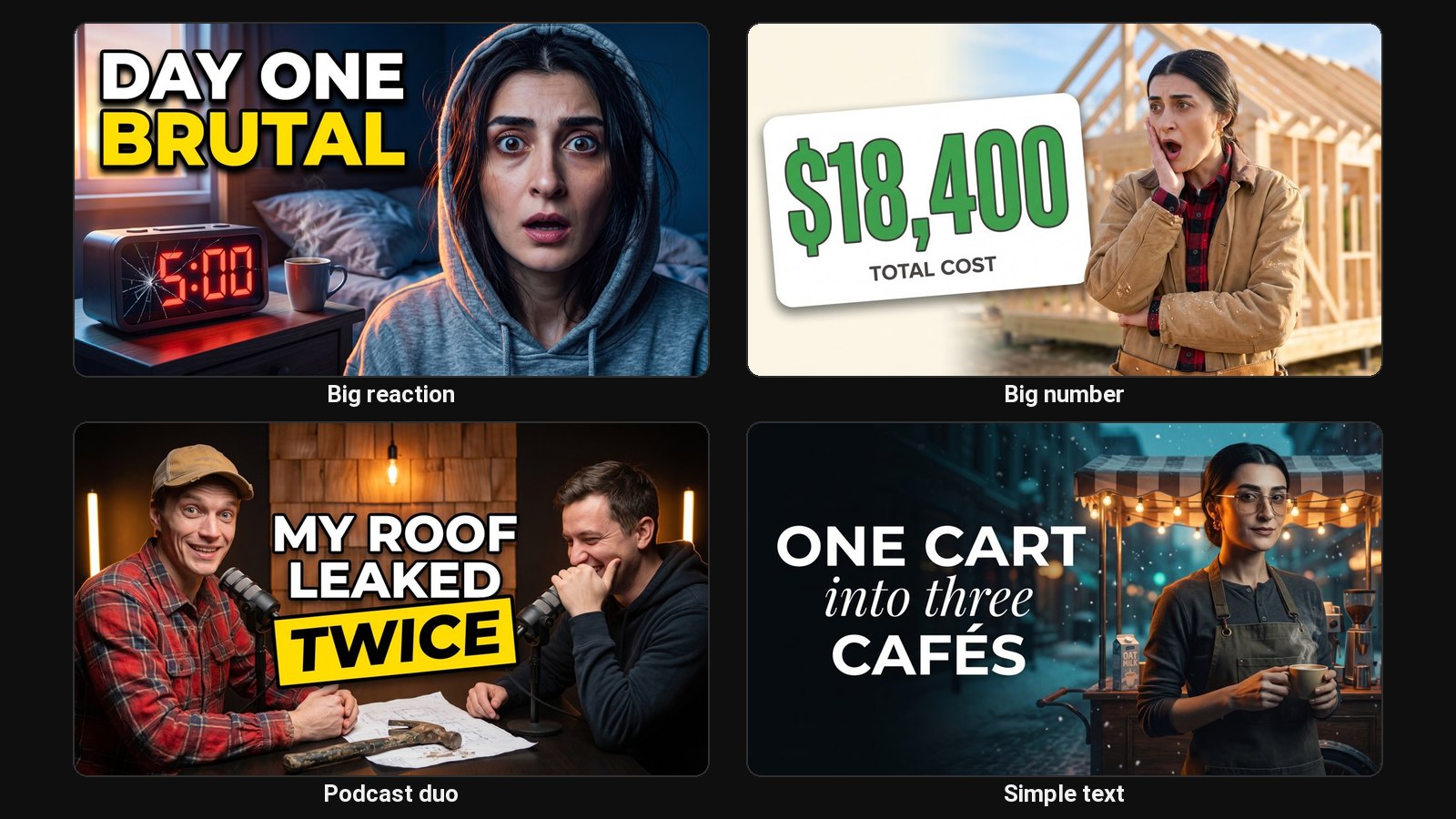
Ask what the viewer needs to see to want the video. A result? Big number or before and after. A choice? Versus. A secret? Circle and arrow. A person? Big reaction or podcast duo. Then use that one idea and nothing else.
Steal the format, not the image
Every big channel uses these same formats with their own faces and topics. To copy a layout you like for your own video, use recreate a YouTube thumbnail. ClipFlame's AI thumbnail maker has all fourteen of these as layouts, plus faceless and Shorts versions, and designs them with your face from one photo.
Common questions
What makes a good YouTube thumbnail?
One clear idea, a big face with a clear emotion, three to five words at most, and strong contrast. It should make sense at phone size in under a second.
What thumbnail works best for a podcast?
The podcast duo: host and guest at their mics with the headline between them. If the guest is well known, make their face bigger; if the quote is the draw, make the words bigger.
Should all my thumbnails look the same?
Keep the fonts, colours and framing consistent so subscribers recognise your videos. Pick the layout per video, based on what that video promises.
What size should a thumbnail be?
16:9, at least 1280 × 720. See YouTube thumbnail size for the full requirements.