YouTube thumbnail size
On this page
YouTube's recommended thumbnail size is 3840 × 2160 pixels (4K), a 16:9 aspect ratio, with a minimum width of 640 pixels. 1280 × 720 still works and is the size most creators design at. Files can be up to 50 MB when you upload in YouTube Studio on a computer, or 2 MB from the phone app, as JPG or PNG. Shorts thumbnails are 2160 × 3840 (9:16).
YouTube raised these limits in late 2025 so thumbnails stay sharp on 4K TVs. Older guides that say "1280 × 720, under 2 MB" aren't wrong about what works, only about what's allowed. The rules below come from YouTube's help page on adding custom thumbnails.
YouTube thumbnail requirements
| Requirement | Videos | Shorts |
|---|---|---|
| Recommended size | 3840 × 2160 pixels | 2160 × 3840 pixels |
| Common working size | 1280 × 720 | 1080 × 1920 |
| Minimum | 640 pixels wide | 640 pixels tall |
| Aspect ratio | 16:9 | 9:16 |
| Maximum file size | 50 MB on desktop, 2 MB in the mobile app | 50 MB on desktop |
| File types | JPG or PNG | JPG or PNG |
| Who can upload | Verified channels | Verified channels, on desktop, as YouTube rolls it out |
Need an image at exactly 1280 × 720? The free YouTube thumbnail resizer crops or fits any image in your browser.
4K or 1280 × 720: which should you upload?
Upload the biggest clean version you have, as long as it's 16:9. If you design at 1280 × 720, that's fine for phones and laptops, where nearly all thumbnails are seen. The 4K size matters on big TV screens, where a 720p image gets scaled up and can look soft.
Don't upscale a small image to 3840 × 2160 to hit the number. YouTube can't add detail that isn't there, and you'll only get a bigger file. Start from a high-resolution photo or video frame instead.
One more reason not to go below 720p: if you run a thumbnail test, YouTube says images smaller than 1280 × 720 are downscaled to 480p (Test & Compare help).
How it shows on each surface
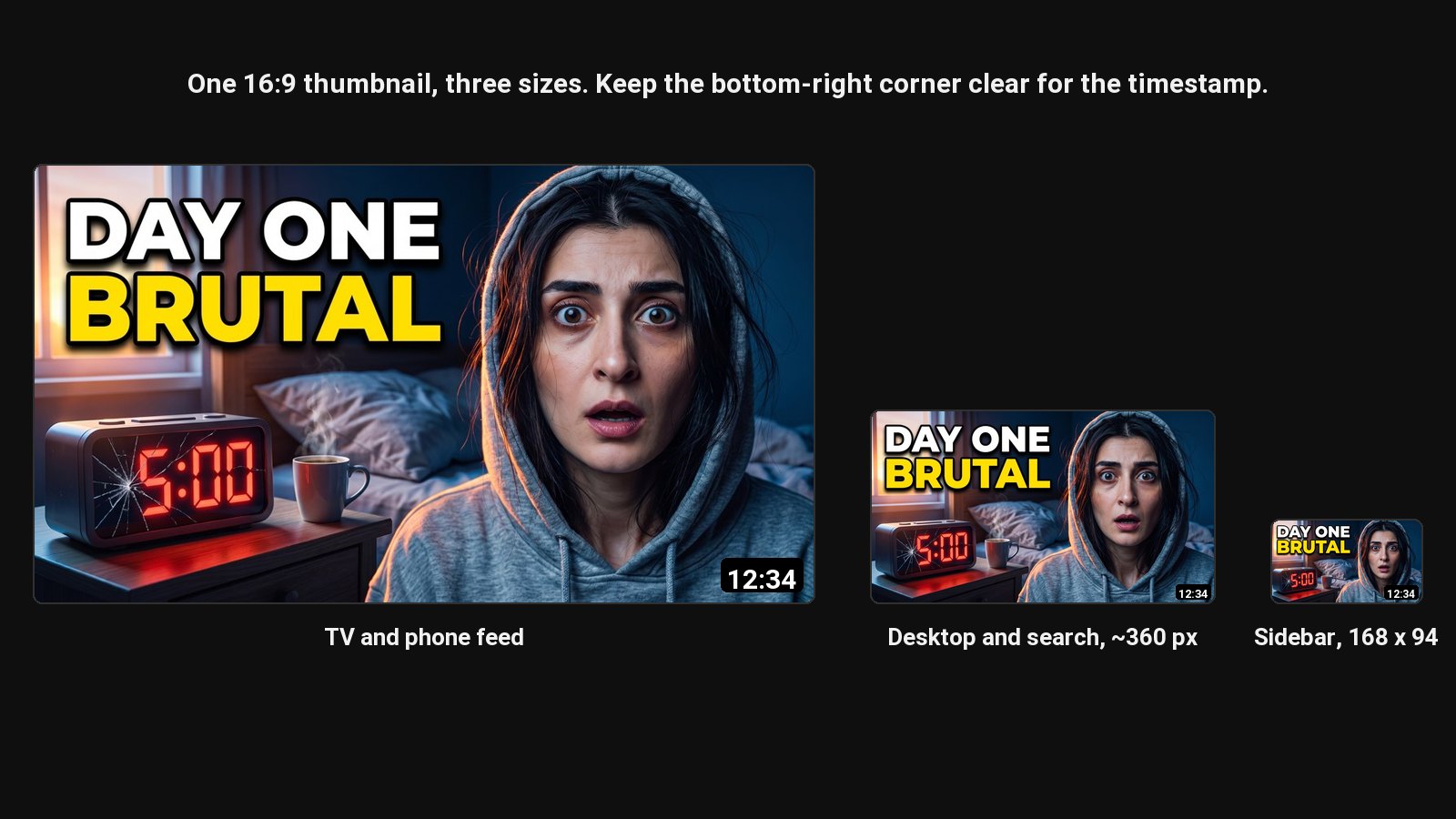
| Surface | Approximate display size | What to check |
|---|---|---|
| Phone home feed | Full screen width | Faces and text are big and clear |
| Desktop home page | About 360 pixels wide | The main subject is obvious |
| Suggested videos sidebar | 168 × 94 | Text still reads, or isn't needed |
| Search results | About 360 pixels wide | Stands out next to similar videos |
| TV app | Very large | Image is sharp, not upscaled |
Preview yours on every one of these with the free thumbnail tester.
The timestamp corner
YouTube puts the video's length in the bottom-right corner of every thumbnail. Keep text and faces out of that corner, roughly the bottom-right 15% of the width and 20% of the height.
File size: 50 MB or 2 MB?
It depends on where you upload. YouTube Studio on a computer accepts up to 50 MB. The YouTube and YouTube Studio phone apps still cap thumbnails at 2 MB, so a big PNG that worked on desktop can be rejected on your phone.
A 1280 × 720 JPG at good quality is usually 150 to 500 KB, which fits everywhere. Save photos as JPG and keep PNG for flat graphics with few colours.
YouTube Shorts thumbnails
Shorts thumbnails are vertical: 2160 × 3840 recommended, 1080 × 1920 in practice. Custom Shorts thumbnails can only be added in YouTube Studio on a computer, and YouTube is rolling the option out channel by channel; Partner Program channels got it first, in July 2026. Where you don't have it yet, you pick a frame from the video in the app. Steps in how to change a YouTube Shorts thumbnail.
Make one at the right size
ClipFlame's YouTube thumbnail maker designs thumbnails with your face and downloads them at 1280 × 720 or 1080 × 1920, under 2 MB, as JPG, so they upload from the app as well as from a computer.
Common questions
What is the best resolution for a YouTube thumbnail?
YouTube recommends 3840 × 2160 (4K). 1280 × 720 is still the practical minimum for a sharp thumbnail on phones and laptops, and it's what most creators use.
What is the maximum file size for a YouTube thumbnail?
50 MB when you upload in YouTube Studio on a computer, 2 MB when you upload from the phone app.
Can a YouTube thumbnail be a GIF?
YouTube's help page now lists JPG and PNG. Use one of those; animated GIFs never played as thumbnails anyway.
Why can't I upload a custom thumbnail?
Your channel needs to be verified. In YouTube Studio, go to Settings, Channel, Feature eligibility and verify with your phone number. For Shorts, you also need the custom thumbnail option, which is still reaching channels.
Why is my thumbnail blurry?
Usually because the image was smaller than 1280 × 720 and YouTube scaled it up, or because a screenshot was saved with heavy compression. Start from a full-size image and export once.